2.1. CSAS: Control Module For Enhanced Criticality Safety Analysis Sequences With KENO
K. B. Bekar, L. M. Petrie1, S. Goluoglu1, D. F. Hollenbach1 and N. F. Landers1
The Criticality Safety Analysis Sequences with
KENO codes provide reliable and efficient means of performing
keff calculations for systems that are routinely encountered in
engineering practice. Two CSAS sequence implementations, CSAS5 and CSAS6,
with two variants of KENO codes, KENO V.a and KENO-VI,
provide identical solution capabilities with different geometry packages.
In the multigroup calculation mode, CSAS uses
XSProc to process the cross sections for temperature corrections and
problem-dependent resonance self-shielding and calculates the keff
of a three-dimensional (3D) system model. If the continuous-energy
calculation mode is selected no resonance processing is needed and the
continuous-energy cross sections are used directly in KENO codes, with
temperature corrections provided as the cross sections are loaded. The
geometric modeling capabilities available in KENO codes coupled with the
automated cross-section processing within the control sequences allow
complex, 3D systems to be easily analyzed.
The CSAS5 search capability available in previous SCALE
versions is no longer supported by the CSAS5 sequence in SCALE 6.3.
In SCALE 6.3, CSAS5 and CSAS6 support two new sequence data blocks,
definitions and tallies data, to allow flexible definition
and output control of mesh tallies. The mesh responses neutron
flux, fission rate, and fission source can now be requested
multiple times on different spatial and energy grids in the
same calculation.
CSAS5 and its related Criticality Safety Analysis sequences are based on the old CSAS2 control
module (no longer in SCALE) and the KENO V.a functional module described in Sect. 8.1.
Therefore, special acknowledgment is made to J. A. Bucholz, R. M. Westfall, and J. R. Knight who developed CSAS2.
G. E. Whitesides is acknowledged for his contributions through early versions of KENO.
Appreciation is expressed to C. V. Parks and S. M. Bowman for their guidance in developing CSAS5.
Criticality Safety Analysis Sequence with KENO V.a (CSAS5)
and KENO-VI (CSAS6) provide reliable and efficient means of
performing keff calculations for
systems that are routinely encountered in engineering practice,
especially in the calculation of keff of three-dimensional (3D)
system models. CSAS5 and CSAS6 implement XSProc to process material input and
provide a temperature and resonance-corrected cross-section library
based on the physical characteristics of the problem being analyzed. If
a continuous energy cross-section library is specified, no resonance
processing is needed and the continuous energy cross sections are used
directly in KENO codes, with temperature corrections provided as the cross
sections are loaded.
The search capability available in the CSAS5S in previous SCALE
versions is no longer supported by the CSAS5 in SCALE 6.3.
This capability was excluded when doing modernization work for
CSAS sequences in SCALE 6.2 and permanently disabled in SCALE 6.3
due to the inconsistencies between the legacy code implementation
and the modern CSAS framework. Research is being continued to
support equivalent search capabilities in a more robust
modernized code framework for the next SCALE release.
In SCALE 6.3, CSAS5 and CSAS6 support two new sequence data blocks,
definitions and tallies data, to allow flexible definition
and output control of mesh tallies. The mesh responses
neutron flux, fission rate, and fission source can now
be requested multiple times on different spatial and
energy grids in the same calculation. This capability
helps users efficiently manage computational resources
when collecting detailed information, depending
on their requirements. For example, fission density
can be tallied in a very fine spatial mesh in a few
energy groups while performing calculations in
high resolution with SCALE’s very fine group multigroup
library (1597 energy groups), or fission density
can be tallied on multiple spatial fine meshes rather
than using a large global fine mesh to keep the runtime
and memory footprint of the calculation at reasonable levels.
In the CSAS sequence framework, SCALE data handling is automated
as much as possible. CSAS and many other SCALE sequences apply a
standardized procedure to provide appropriate number densities and
cross sections for the calculation. XSProc is responsible for reading
the standard composition data and other engineering-type specifications,
including volume fraction or percent theoretical density, temperature,
and isotopic distribution as well as the unit cell data. XSProc then
generates number densities and related information, prepares geometry
data for resonance self-shielding and flux-weighting cell calculations,
if needed, and (if needed) provides problem-dependent multigroup
cross-section processing. Sequences that execute KENO codes include a
KENO Data Processor to read and check the KENO data.
When the data checking has been completed, the control
sequence executes XSProc to prepare a resonance-corrected microscopic
cross-section library in the AMPX working library format if a multigroup
library has been selected.
For each unit cell specified as being cell-weighted, XSProc performs the
necessary calculations and produces a cell-weighted microscopic
cross-section library. KENO codes may be executed to calculate the
keff or neutron multiplication factor using the cross-section
library that was prepared by the control sequence.
Computational capabilities available in KENO codes—including the determination of k-effective,
neutron lifetime, generation time, energy-dependent leakages,
energy- and region-dependent absorptions, fissions,
the system mean-free-path, the region-dependent mean-free-path,
average neutron energy, flux densities, fission densities,
reaction rate tallies, mesh tallies, source convergence
diagnostics, problem-dependent continuous-energy temperature
treatments, parallel calculations, restart capabilities, and many more—are also provided by the CSAS5 sequence. Details of each capability,
their input methods, and output edits are provided in
Sect. 8.1 of this document and will not be repeated here.
The CSAS control module
was developed to use simple input data and
prepare problem-dependent cross sections for use in calculating the
effective neutron multiplication factor of a 3D system using KENO codes,
KENO V.a and KENO-VI.
An attempt was made to make the system as general as possible within the
constraints of the standardized methods chosen to be used in SCALE.
Standardized methods of data input were adopted to allow easy data entry
and for quality assurance purposes. Some of the limitations of the CSAS
multigroup sequences are a result of using preprocessed multigroup
cross sections. Inherent limitations in multigroup CSAS calculations
are as follows:
1. Two-dimensional (2D) effects such as fuel rods in assemblies where
some positions are filled with control rod guide tubes, burnable
poison rods and/or fuel rods of different enrichments. The
cross sections are processed as if the rods are in an infinite
lattice of identical rods. If the user inputs a Dancoff factor for
the cell (such as one computed by MCDancoff), XSProc can produce an
infinite lattice cell, which reproduces that Dancoff. This can
mitigate some two dimensional lattice effects
When continuous energy KENO calculations are desired, none of the
resonance processing capabilities of XSProc are applicable or needed.
The continuous energy cross sections are directly used in KENO. An
existing multigroup input file can easily be converted to a continuous
energy input file by simply specifying the continuous energy library. In
this case, all cell data is ignored. However, the following limitations
exist:
If CELLMIX is defined in the cell data, the problem will not run in
the continuous energy mode. CELLMIX implies new mixture cross
sections are generated using XSDRNPM-calculated cell fluxes and
therefore is not applicable in the continuous energy mode.
Only VACUUM, MIRROR, PERIODIC, and WHITE boundary conditions are
allowed. Material-specific albedos, e.g., WATER, CARBON, POLY,
etc., are for multigroup only.
Problems with DOUBLEHET cell data are not allowed as they inherently
utilize CELLMIX feature.
This section describes the input data required for the CSAS with
KENO transport codes. A typical CSAS input,
shown in Example 2.1.1, starts
with the sequence identifier always preceded by the = sign
(=CSAS5 and =CSAS6), and
it is followed by the problem title. Then, a cross section library
name is specified, and all these entries are followed by several
data blocks each starting with READdata_block and
ending with ENDdata_block.
=sequence_identifier parm=(parm_options)
problem title
' ----- XSProc data' cross section library name (REQUIRED)
ce_v7.1' List of material specifications in standard SCALE format (REQUIRED)read composition
...
end composition' Specify data for resonance processing (OPTIONAL)read celldata
...
end celldata' ---- New CSAS sequence data blocks' Used to define energy bounds and grid geometries for' the tallies defined in tallies data block' (REQUIRED if tallies data block exists)read definitions
...
end definitions' Used to define tallies in a more robust way (OPTIONAL)read tallies
...
end tallies' ---- KENO transport data' Specify the problem geometry (REQUIRED)read geometry
...
end geometry' Other input data blocks (OPTIONAL)
The input data for the CSAS sequence are composed of three broad
categories of data, as shown in Example 2.1.1.
The first is XSProc data, including Standard Composition
Specification Data and Unit Cell Geometry Specification Data.
This first category specifies the cross section library and then
defines the composition of each mixture and optionally unit cell
geometry that may be used to process the cross sections.
This data block is necessary for the CSAS sequence.
Note
Sequence implementation determines the calculation
(transport) mode automatically, either as multigroup or
continuous-energy, by testing the cross section library
whose name has been entered.
Warning
Continuous-energy mode does not process data entered in
celldata data block(s).
The second category of data, the CSAS sequence input data, includes
two new data blocks, definitions data and tallies data, for
flexible tally definitions. These new blocks available in all CSAS
sequences in SCALE 6.3 currently provide only accumulation of neutron
flux, fission rate, and neutrons produced from fission on
different energy and spatial grids. Although similar to capabilities
activated with old-style KENO parameter input methods (with GFX,
CDS, and FIS as described in Sect. 8.1.3.3), these input
methods do not allow tallying the requested quantities on different
energy and spatial grids. This limitation is relaxed with the new
CSAS input blocks.
The third category of data, the KENO input data, is
used to specify the geometric and boundary conditions that
represent the physical 3D configuration of a KENO problem.
CSAS ensures data consistency among these three category of data.
For example, it verifies that mixture numbers used in the KENO
geometry data block must correspond to those defined
either in the composition data or celldata data blocks.
Note that in multigroup mode, a unique mixture number can be
specified in the celldata data block by CELLMIX=
if the cell is cell-weighted.
Note
As depicted in Example 2.1.1, a successful CSAS
calculation requires at least a problem title and cross section
library definitions, followed by composition data and
geometry data. Depending on the requirements of the problem,
other optional data blocks can be activated.
Following CSAS5 input demonstrates this minimal requirement.
=csas5
sample problem 14 u metal cylinder in an annulus
ce_v7.1read comp
uranium 1 den=18.69 1 300 92235 93.2 92238 5.6 92234 1.0 92236 0.2 endend compread geom
global unit 1
cylinder 1 1 8.89 10.109 0.0 orig 5.0799 0.0
cylinder 0 1 13.97 10.109 0.0
cylinder 1 1 19.05 10.109 0.0end geomend dataend
Unlike the CSAS5 and CSAS6 versions in previous SCALE releases,
in SCALE 6.3, user can enter all data blocks in any order in both
CSAS5 and CSAS6 inputs. Following CSAS5 input illustrates this
input flexibility.
=csas5
sample problem 14 u metal cylinder in an annulus
ce_v7.1read geom
global unit 1
cylinder 1 1 8.89 10.109 0.0 orig 5.0799 0.0
cylinder 0 1 13.97 10.109 0.0
cylinder 1 1 19.05 10.109 0.0end geomread comp
uranium 1 den=18.69 1 300 92235 93.2 92238 5.6 92234 1.0 92236 0.2 endend compend dataend
All data are entered in free form, allowing alphanumeric data,
floating-point data, and integer data to be entered in an unstructured
manner. Up to 252 columns of data entry per line are allowed. Data can
usually start or end in any column with a few exceptions. As an example,
the word END beginning in column 1 and followed by two blank spaces or a
new line will end the problem and any data following will be ignored.
Each data entry must be followed by one or more blanks to terminate the
data entry. For numeric data, either a comma or a blank can be used to
terminate each data entry. Integers may be entered for floating-point
values. For example, 10 will be interpreted as 10.0. Imbedded blanks are
not allowed within a data entry unless an E precedes a single blank as
in an unsigned exponent in a floating-point number. For example, 1.0E 4
would be correctly interpreted as 1.0 \(\times\) 104.
The word “END” is a special data item. An “END” may have a name or label
associated with it (e.g., “END DATA”). The name or label associated with
an “END” is separated from the “END” by a single blank and is a maximum
of 12 characters long. At least two blanks or a new line MUST follow
every labeled and unlabeled ``END``. It is the user’s responsibility to
ensure compliance with this restriction. Failure to observe this
restriction can result in the use of incorrect or incomplete data
without the benefit of warning or error messages.
Multiple entries of the same data value can be achieved by specifying
the number of times the data value is to be entered, followed by either
R, \*, or $, followed by the data value to be repeated. Imbedded blanks
are not allowed between the number of repeats and the repeat flag. For
example, 5R12, 5*12, 5$12, or 5R 12, etc., will enter five successive
12’s in the input data. Multiple zeros can be specified as nZ where n is
the number of zeroes to be entered.
The purpose of this section is to define the input data in discrete
subsections relating to a particular type of data. Tables of the input
data are included in each subsection, and the entries are described in
more detail in the appropriate sections.
Resonance-corrected cross sections are generated using the appropriate
boundary conditions for the unit cell description (i.e., void for the
outer surface of a single unit, white for the outer surface of an
infinite array of cylinders). As many unit cells as needed may be
specified in a problem. A unit cell is cell-weighted by using the
keyword “CELLMIX=” followed by a unique user specified mixture number in
the unit cell data.
To check the input data without actually processing the cross sections
and without performing transport calculations, the sequence parameter
options PARM=CHECK or PARM=CHK should be entered, as shown below.
=CSAS5 PARM=CHK

=CSAS6 PARM=CHK
This will cause the input data for CSAS to be checked and appropriate
error messages to be printed. If plots are specified in the data, they
will be printed. This feature allows the user to debug and verify the
input data while using a minimum of computer time.
The XSProc reads the standard composition specification data and the
unit cell geometry specifications. It then produces the mixing table and
unit cell information necessary for processing the cross sections if
needed. Sect. 7 of this manual provides a detailed
description of the input data and processing options. CSAS sequences
are responsible for passing data such that mixing table and
problem-dependent cross sections from XSProc calculations are conveyed to
the transport calculations. Note that reported elapsed time
in each transport calculation does not include the time required
to process and prepare multigroup cross section data.
When running the transport module concurrently on multiple cores,
these data are broadcasted to all instances of the transport
module running on each computational node.
In contrast, in continuous-energy mode, only mixing table
data generated from XSProc utilities are passed to the transport module.
In addition to this, the defined continuous-energy data library
is first verified by the utilities that exist in XSProc, and
then temperature correction is applied to each nuclide data
using the defined temperatures when loading these data from
disk by each instance of the transport module. Therefore,
elapsed time reported at the end of each transport module
calculation also includes the time spent on temperature
correction and data loading.
In multigroup mode, the XSProc calculation path for each unit cell
is always determined with the following hierarchy to prepare
the problem-dependent multigroup cross section data:
All non-fissionable cells are processed with BONAMI by default,
and this cannot be changed.
All fissionable cells are processed with CENTRM by default,
and this can be overridden by defining a cross section processing
option with the sequence parameter option (PARM=BONAMI or PARM=2REGION).
Double-het cells defined in the celldata data block are always
processed with CENTRM, and this cannot be changed.
CSAS sequences always print a cross section processing
summary of the cells used/defined in the problem. This can be seen in
Sect. 2.1.5.3. See Sect. 7 of this manual for detailed
description of these unit cell processing options.
Two new data blocks, definitions data and tallies data,
are currently supported by CSAS sequences to provide flexible
tally definitions. These new data blocks are currently available
to define the mesh responses flux, fission_density, and fission_source
on different spatial and energy grids. This section introduces
these two new data blocks and discusses the limitations with
some details.
The definitions data input block allows (1) multiple spatial
grids to be defined using the gridGeometry data blocks inside
the definitions data block,
and (2) multiple energy grids to be defined using the
energyBounds data inside the definitions data block.
The syntax for defining a gridGeometry inside a definitions
block is the same as defining a standalone grid at the
root level of input (i.e., KENO’s gridgeometry data block).
The syntax for defining energyBounds is already used for
defining energy grids in the MAVRIC sequence. See Sect. 8.2
for further details.
The energy grid definition permits specification of individual energy boundaries,
equal-width energy bins and equal-width lethargy bins within a specified energy,
and SCALE energy group structures (such as the 56-group structure).
The SCALE energy group structure can be any group structures that is used by a
SCALE multigroup library that is available in the DATA directory. The syntax
is <num>n for neutron libraries and <num>p for photon (gamma) libraries.
A combination of the different options is also supported (see Example 2.1.2).
Note
As shown in example given Example 2.1.2READ keyword is not required when defining energy boundaries with
energyBounds data block. This may show differences from one CSAS
sequence to another.
Example 2.1.2 Typical spatial and energy grid specifications in the definitions data block
In continuous-energy mode, a special DEFAULT keyword
allows modification of the default energy group structure
that was previously defined with the NGP parameter and/or
the KENO energy data block.
Note
The default energy group structure is currently
acquired from the SCALE 252-group neutron library. This may
be overridden by defining data with the NGP parameter,
data in the KENO energy data block, or data in
the definitions data block entered with DEFAULT keyword.
Caution
CSAS does not allow using definitions data block
together with KENO NGP parameter and/or KENO energy data
block.
Caution
CSAS does not allow using definitions data block
together with KENO FIS, GFX, CDS, and MSH parameters.
In multigroup mode, DEFAULT energy boundaries are
always obtained from the multigroup library used by KENO codes
in the neutron transport calculation, and
this cannot be overriden by a DEFAULT energy boundaries
specification in the definitions data block. In other words,
an energyBounds DEFAULT is not permitted in multigroup mode.
Warning
In multigroup mode, DEFAULT energy boundaries are
always acquired from the library used by the KENO V.a transport,
and it cannot be changed.
Caution
In multigroup calculations, energy points of the user-defined
energy boundaries must be a subset of the energy points of
the energy structure obtained from the multigroup library used by
KENO transport. Otherwise, execution will be terminated and
an appropriate error message is displayed.
The sample definitions data block given in Example 2.1.3
defines an energy grid labeled 1 and an energy grid labeled DEFAULT
in the definitions data block.
Example 2.1.3 Definitions data block with DEFAULT energyBounds specification
READ DEFINITIONS
'user defined energy grid 1read energyBounds 1
bounds 2e7 0.625 1e-5 endend energyBounds
'user defined default energy grid
energyBounds DEFAULT
bounds 2e7 8.2e5 2.0e4 1.05e2 5.0 0.65 0.15 0.04 1.e-5 endend energyBoundsEND DEFINITIONS
When using this definitions block in
continuous-energy mode, KENO codes read DEFAULT energy boundaries from
the definitions data and utilizes these data in all tally
calculations (energyBoundsDEFAULT overrides the current
default that is acquired from the SCALE 252-group library) if requested otherwise
in the tallies block for the supported mesh responses. The two
energy boundaries read from definitions data are printed
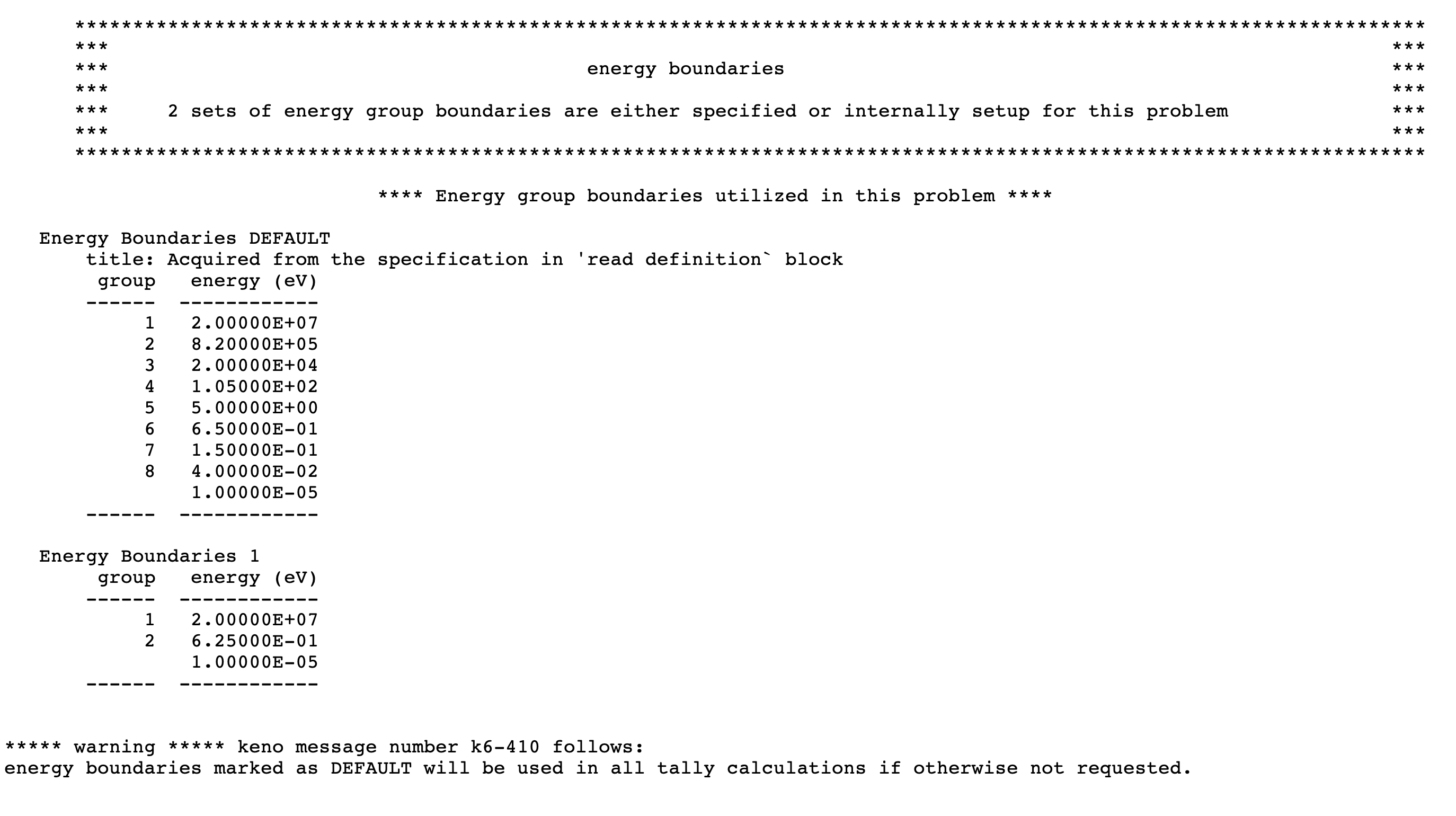
in KENO’s energy boundaries edit in the output as shown in
Fig. 2.1.1.
Fig. 2.1.1 Sample energy boundaries output edit when running CSAS with the above definitions data in the continuous-energy mode.
Unlike continuous-energy mode, when the data defined in
the sample definition block given above are processed in
mutigroup mode, reading the energy boundaries DEFAULT
from the definitions data is ignored, and the user is notified with a
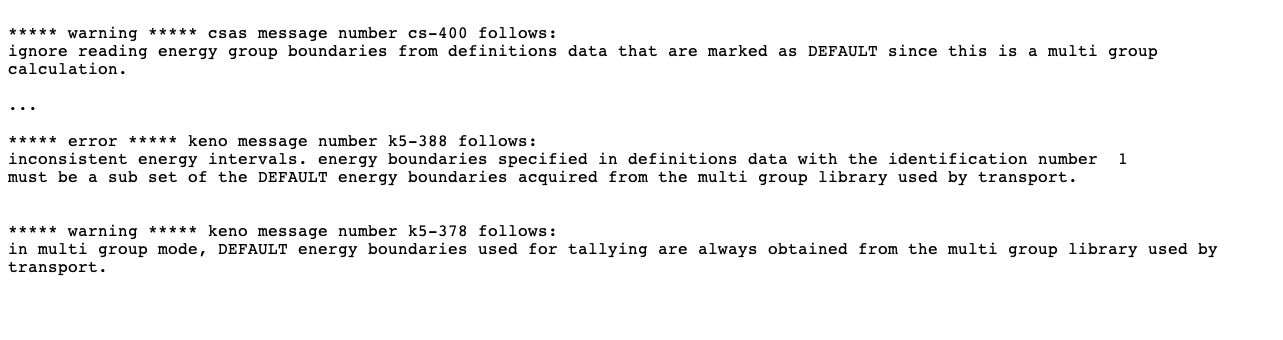
warning message, as shown in Fig. 2.1.2.
However, the calculation is terminated because the
energy boundaries given with energy identifier 1 does
not conform to the default energy boundaries acquired from
the library used by KENO transport (in this test case,
the SCALE 28-group neutron and 19-group gamma library was used).
The corresponding error message is also shown in
Fig. 2.1.2 printed
to the output just before the code termination.
Fig. 2.1.2 CSAS terminates execution with an error message when the definitions data given above are used in multigroup mode.
The new tallies data input allows mesh responses to be
requested using any energy grid and/or spatial grid from
the definitions block. Three response types shown in
Table 2.1.1 were added as
mesh tally options for CSAS. Note that the same
responses can also be activated by GFX, FIS,
and CDS, but only using the default energy boundaries.
Table 2.1.1 Mesh tallies available with tallies data block.
Description
Old KENO input method to
activate the same tally
New response name
in tallies implementation
Neutron flux averaged over mesh volumes
GFX
flux
Fission rates per voxel volume
FIS
fission_density
Neutron production per voxel volume
CDS
fission_source
Note
Either input method (parameter input or tallies data)
can be used to request the mesh tallies described in Table 2.1.1.
It is recommended to request mesh tallies using the new response names (flux,
fission_density, fission_source) with the tallies data
block rather than the old-style parameter inputs (GFX, FIS, CDS)
with the limited energy and spatial grid options.
A typical mesh tally input block is given in Example 2.1.4.
Each spatial and energy grid used by each mesh tally must be defined in
the definitions data block. Note that, as shown in Example 2.1.4, the same mesh response can be defined multiple times using different
spatial and energy grids.
Example 2.1.4 Typical mesh tally specifications in tallies data
The KENO codes in SCALE 6.3 support multiple sets of
energy group boundaries for tallying purposes. A data
container was designed to store all energy boundaries
that are either set up by KENO for some internal use
or specified by the user. Note that multiple
sets of energy boundaries can be defined only by
using the new definitions data block available in CSAS
and TRITON sequences. In continuous-energy mode,
KENO with the NGP parameter or data in energy
data block provides only a single set of energy boundaries, and
these always override KENO’s default energy group
boundaries used in all tallies.
After processing data entered in the definitions and
tallies data blocks, KENO codes print the summary of
all corresponding definitions in energy boundaries,
grid definitions, and tally definitions output edits.
The following sample input can be used to demonstrate
the new output edits in KENO codes with continuous-energy mode:
read definitionsread gridgeometry 11
numxcells=2 numycells=2 numzcells=2
xmin=-0.73 xmax=0.73
ymin=-0.73 ymax=0.73
zmin=0 zmax=10.0end gridgeometryread gridgeometry 12
numxcells=2 numycells=2 numzcells=8
xmin=-0.73 xmax=0.73
ymin=-0.73 ymax=0.73
zmin=0 zmax=10.0end gridgeometryread gridgeometry 13
numxcells=4 numycells=2 numzcells=4
xmin=-0.73 xmax=0.73
ymin=-0.73 ymax=0.73
zmin=0 zmax=10.0end gridgeometryread energyBounds 12
title "ebounds is a sub-set of 8 group MG test library"
bounds
2.00000E+071.05000E+025.00000E+001.00000E-05endend energyBoundsread energyBounds DEFAULT
title "SCALE 8 group test library structure"
bounds
2.00000E+078.20000E+052.00000E+041.05000E+025.00000E+006.50000E-011.50000E-014.00000E-021.00000E-05endend energyBoundsend definitionsread talliesread mesh 1
energy=DEFAULT
grid=11
response=FLUX
end meshread mesh 2
energy=DEFAULT
grid=12
response=FLUX
end meshread mesh 3
energy=12
grid=13
response=FLUX
end meshread mesh 100
energy=12
grid=12
response=FISSION_DENSITY
end meshread mesh 200
energy=DEFAULT
grid=13
response=FISSION_DENSITY
end meshread mesh 1000
energy=12
grid=11
response=FISSION_SOURCE
end meshread mesh 1080
energy=DEFAULT
grid=13
response=FISSION_SOURCE
end meshend tallies
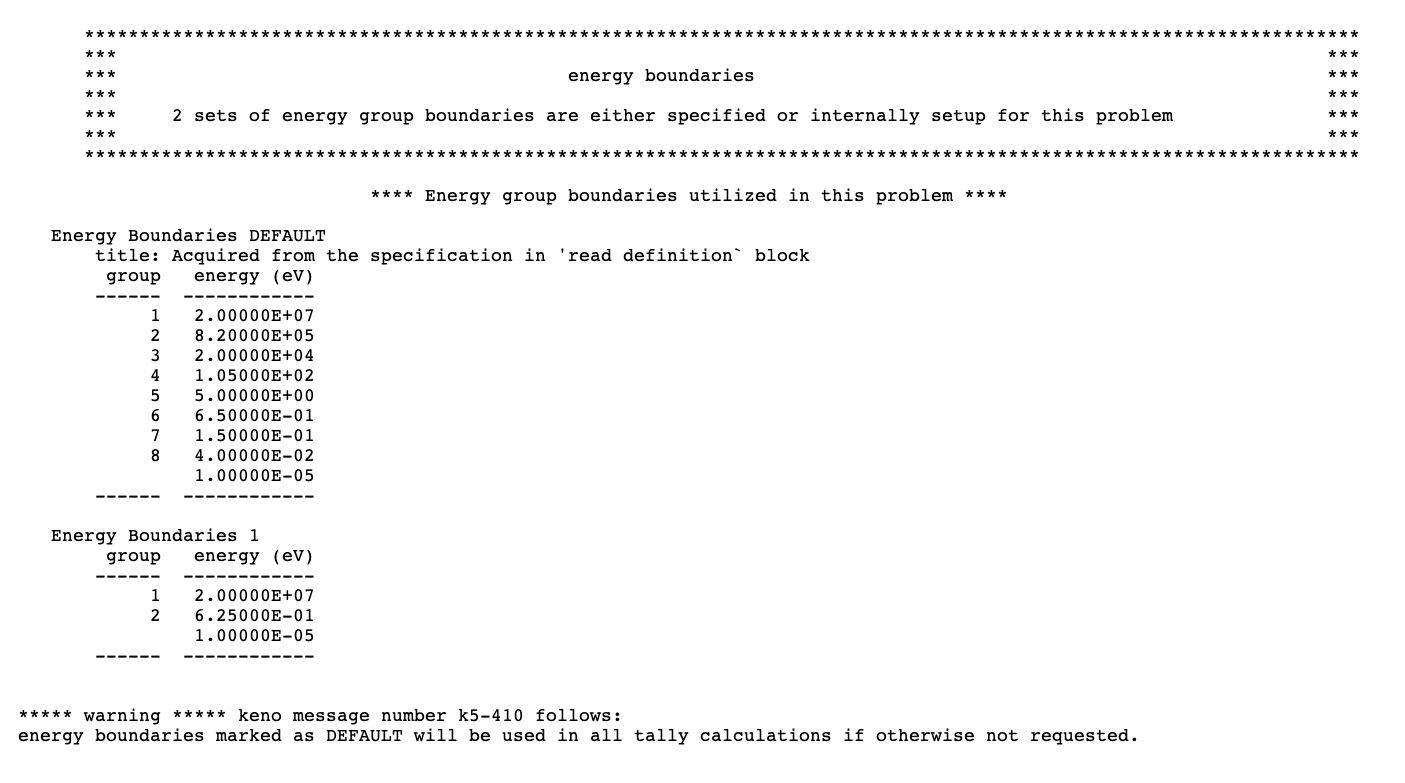
The energy boundaries output edit depicted in Fig. 2.1.3
summarizes the data stored in the energy boundaries data container.
For the above sample problem, two sets of energy group boundaries
are read from the definitions data and stored in the data container.
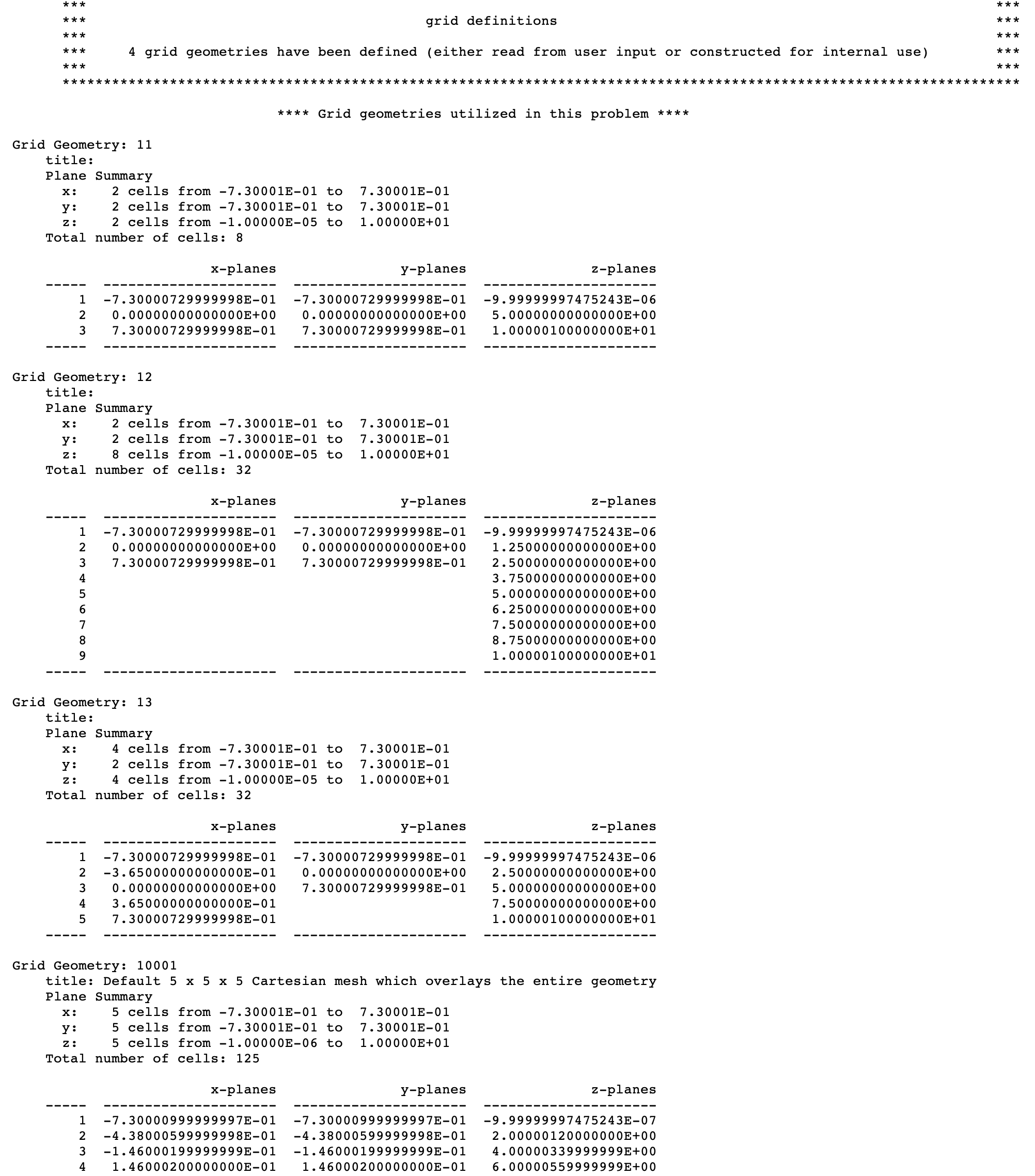
Another edit that was added to KENO’s output is the
grid definitions edit, which summarizes the mesh grids
that were either defined by the user or automatically
constructed by KENO for Shannon entropy tallies.
The grid definitions output edit corresponds to
the above provided sample input and is shown in Fig. 2.1.4.
Note that Fig. 2.1.4 shows
only a part of the mesh tallies output edit.
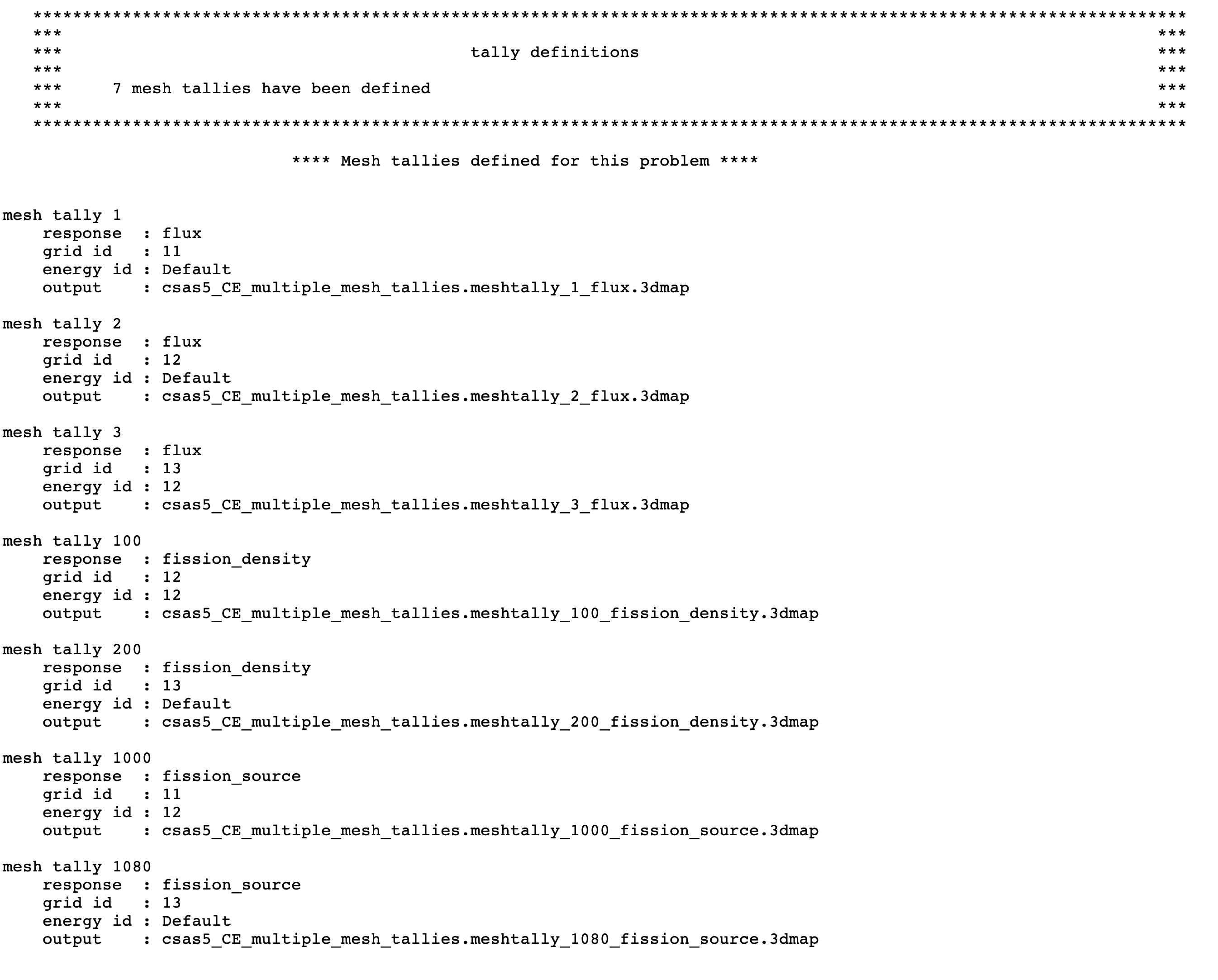
The tally definitions output edit summarizes the
specifications of tallies defined in tallies block.
Currently, only mesh tally edits are supported, and
this is shown in
Fig. 2.1.5 for the above sample input.
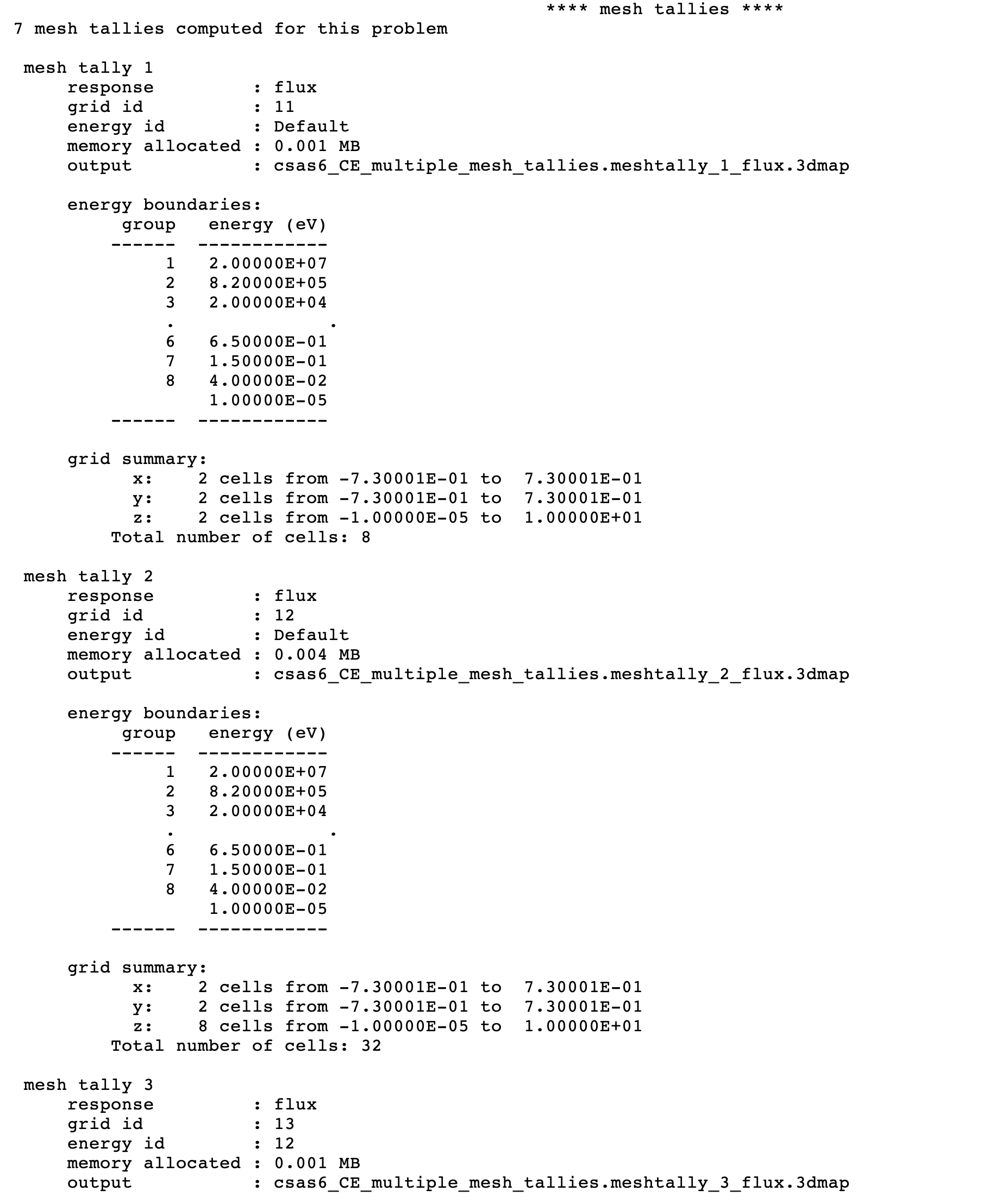
After the calculations have been completed for all
the requested tallies, KENO also prints another
output table that summarizes the mesh tallies, as
shown in Fig. 2.1.6.
Other than the mesh tally input specifications,
the mesh tallies output edit also summarizes
the intervals of the energy and spatial grids
used in tally calculations and approximate memory
allocation required to compute
and write this tally to 3dmap output file. Note that
Fig. 2.1.6 shows
only a part of the mesh tallies output edit.
Depending on the user input specifications, the
naming of the mesh tally 3dmap output files show
some variations. Table 2.1.2
lists the 3dmap output filenames for each response type if
only a single tally was requested for each response type. And,
Table 2.1.3
lists the 3dmap output filenames for each response type if
multiple mesh tallies are requested with the same response type.
In such a case, the output filenames are updated with the
keyword meshtally followed by the mesh id (mesh identifier
used to define each mesh in tallies data).
Table 2.1.2 Mesh tally 3dmap file naming when a single response is requested
response
3dmap file name
flux
${BASENAME}.flux.3dmap
fission_density
${BASENAME}.fission_density.3dmap
fission_source
${BASENAME}.fission_source.3dmap
Note
Mesh tallies activated with old-style input method
(using the GFX, CDS, and FIS parameters) also
use the definitions for 3dmap file naming given
in Table 2.1.2.
Table 2.1.3 Mesh tally 3dmap file naming when a response is requested multiple times
Table 2.1.4 contains the outline for the KENO input. A typical
KENO input is divided into 13 data blocks. A brief outline of
commonly used data blocks is shown in Table 2.1.4. Note that
parameter data must precede all other KENO data blocks when running
standalone KENO codes; however, this is not
applied to the KENO calculations performed as part of each CSAS sequence.
As described in above sections, a minimal CSAS input always requires
geometry data, and KENO data blocks listed in Table 2.1.4
can be defined in any order.
Information on all KENO input is provided in
Sect. 8.1 of this document and will not be repeated here.
This section contains a brief description and explanation of the
CSAS sequence. As CSAS was designed as a SCALE control
module/sequence its own output is minimal.
To avoid duplicate output edits, it suppresses
the output from KENO Data processor except
a few diagnostic and warning messages while processing the
KENO data blocks. Because the KENO Data processor and KENO
codes produce the same output edits for some input data,
capturing both output
sections and keeping printing them may result in duplicate
information in the output sections for those input data.
CSAS always captures the XSProc and KENO outputs
and prints them in the code output. Because these output
sections are described and their details are
discussed in Sect. 8.1.5 and Sect. 7.1.1 and
relevant XSProc sections, they will not be described
in this section.
When CSAS is run with PARM=CHECK,
only outputs from KENO Data processor and XSProc input
processor are shown in the code output.
The sample output sections presented in this section
were from one of the calculations performed by CSAS5.
Here, only CSAS5 examples are given to prevent repetition
because CSAS6 prints the same tables in the same format
with the same content.
After the header page, program verification information
is printed that lists the name of the program and the
revision number. The job name, date, and time of execution
are also printed as shown in Fig. 2.1.7.
This information may be used for quality
assurance purposes.
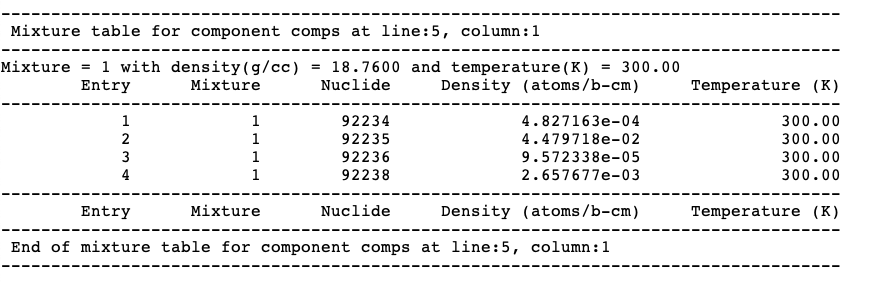
The first table printed by CSAS codes lists the compositions
read and processed from the data entered in the composition data
block. Basically, this table echos what user defined in the
composition data block; data for each mixture are printed.
First the mixture number, density, and temperature are printed,
followed by a table of the nuclides which make up the mixture.
This table contains the following data: mixture ID number,
nuclide ZA number, atom density and temperature. A sample
mixture table is shown in Fig. 2.1.8.
This output table prints only all mixtures read and
processed from the composition data block. Any mixture
defined with CELLMIX in celldata block is not printed here.
Note
The mixing table printed in KENO output may not
reflect the mixture properties listed in this output table.
Any mixture which is defined in composition data
block but not used in KENO transport process will not be
printed in KENO mixing table data edits. KENO also prints
the mixture data defined with CELLMIX or defined
in Double-het cell treatment in KENO mixing table data
edits in the output. See Sect. 8.1.3.10 for further
details about the KENO mixing data.
In multigroup mode, cross section processing
calculation path with XSProc show
some differences depending on the type of the
unit cells being processed and/or desired calculation
methodology defined by user as discussed in
Sect. 2.1.4.1. CSAS sequences summarize which of the XSProc
calculation path is used when processing the unit cells in
XSProc in the output.
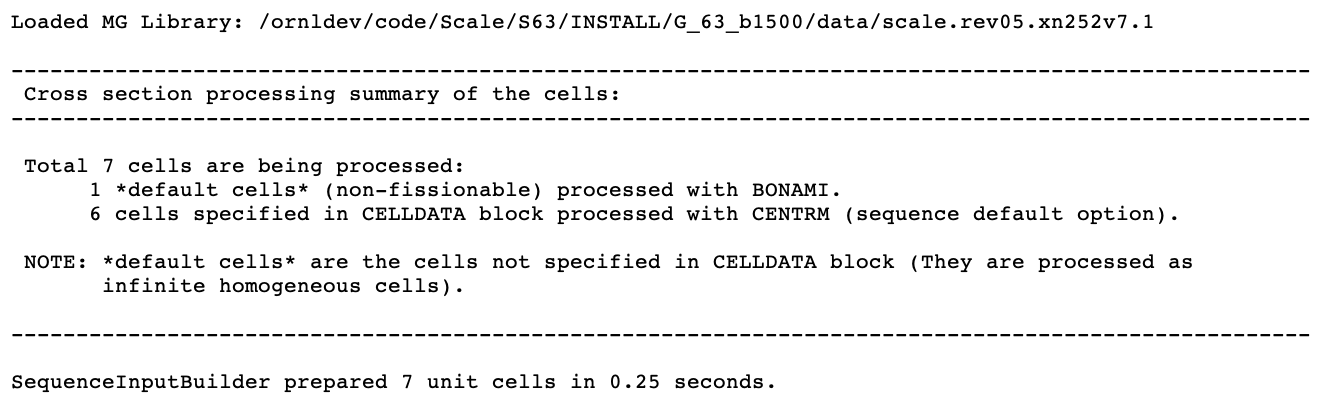
A typical cross section processing summary table printed
by a CSAS sequence in the code output is
shown in Fig. 2.1.9.
The first record printed in this table is the multigroup
cross section library which will be used in the calculations.
This is followed by the cross section processing summary
of the unit cells for this problem. This table includes
the total number of unit cells being processed,
and the number of unit cells processed with CENTRM and
BONAMI calculations path. The last record printed
in this table is the total elapsed time to process
the XSProc data and build all the unit cells for the
subsequent XSProc calculations.
CSAS sequence always creates a unit cell for all
the mixtures defined in the composition data block
and stores them in a cell container. Then, XSProc
cross section processing is applied to all the unit
cells stored in the cell container regardless of
whether they are used in KENO transport calculation.
Performing cross section processing for the unused
mixtures, especially fissile mixtures, might waste
the allocated computational resources for this calculation.
CSAS sequence contains two types of warning and error messages.
The first type of messages are from XSProc and SCALE sequence
implementation which are common to many of the SCALE sequences.
The second type of messages are mainly from the KENO Data
processor as part of CSAS sequence implementation,
and identified by CS- followed by a number. The details
of the messages from KENO Data processor can be seen in Sect. 8.1.6.
Warning messages appear when a possible error is encountered.
It is the responsibility of the user to verify whether the
data are correct when a warning message is encountered.
The functional modules, XSProc and KENO, activated by CSAS
sequences will be executed if no error messages are generated
and a warning message has been generated.
When an error is recognized, an error message is written and
an error flag is set so the functional modules will not be
activated. the code stops immediately if the error is too severe to
allow continuation of input. However, it will continue to read and check the
data if it is able. When the data reading is completed, execution is terminated
if an error flag was set when the data were being processed. If the error flag
has not been set, execution continues. When error messages are present
in the output, the user should focus on the first error message, because
subsequent messages may have been caused by the error that generated the
first message.
The messages listed below complement the messages, which
are from KENO Data processor, listed in KENO manual section, Sect. 8.1.6.
CS-21 A UNIT NUMBER WAS ENTERED FOR THE CROSS-SECTION LIBRARY.
(LIB= IN PARAMETER DATA.) THE DEFAULT VALUE SHOULD BE USED IN ORDER TO
UTILIZE THE CROSS SECTIONS GENERATED BY CSAS. MAKE CERTAIN THE CORRECT
CROSS-SECTION LIBRARY IS BEING USED.
This message is from subroutine CPARAM. It indicates that a value has
been entered for the cross-section library in the KENO V.a parameter
data. The cross-section library created by the analytical sequence
should be used. MAKE CERTAIN THAT THE CORRECT CROSS SECTIONS ARE BEING
USED.
CS-55 *** ERRORS WERE ENCOUNTERED IN PROCESSING THE KENO DATA.
EXECUTION IS IMPOSSIBLE. ***
This message from subroutine SASSY is printed if errors were found in
the KENO input data for CSAS. When the data reading and checking
have been completed, the problem will terminate without executing. Check
the printout to locate the errors responsible for this message.
CS-62 *** ERROR *** MIXTURE ______ IN THE GEOMETRY
WAS NOT CREATED IN THE STANDARD COMPOSITIONS SPECIFICATION DATA.
This message from subroutine MIXCHK indicates that a mixture specified
in the KENO geometry was not created in the standard composition
data.
CS-68 *** ERROR *** AN INPUT DATA ERROR HAS BEEN ENCOUNTERED
IN THE ______ DATA ENTERED FOR THIS PROBLEM.
This message from the main program, CSAS, is printed if the subroutine
library routine LRDERR returns a value of “TRUE,” indicating that a
reading error has been encountered in the “KENO PARAMETER” data.
The appropriate data type is printed in the
message. Locate the unnumbered message stating “ERROR IN INPUT.
CARD IMAGE PRINTED ON NEXT LINE”. Correct the data and resubmit
the problem.
CS-69 ***ERROR*** MIXTURE ______ IS AN INAPPROPRIATE MIXTURE NUMBER
FOR USE IN THE KENO GEOMETRY DATA BECAUSE IT IS A COMPONENT OF THE
CELL-WEIGHTED MIXTURE CREATED BY XSDRNPM.
This message from subroutine CMXCHK indicates that a mixture that is a
component of a cell-weighted mixture has been used in the KENO
geometry data.
CS-100 *** ERROR *** THIS PROBLEM WILL NOT BE RUN BECAUSE ERRORS WERE
ENCOUNTERED IN THE INPUT DATA.
This self-explanatory message indicates that an error occurred in
input processing. User should examine the
printout to locate the error or errors in the input data. Correct them
and resubmit the problem.
This section contains example problems to demonstrate some of
capabilities available in CSAS with KENO codes.
A brief problem description and the associated input data for
multigroup mode of calculation are included for each problem.
The same sample problems may be executed in the continuous
energy mode by changing the library name from v7.1-252 to
ce_v7.1. The complete list of libraries distributed with
SCALE is provided in the Nuclear Data Libraries chapter.
This section contains sample problems to demonstrate some of the options
available in CSAS5. Note that sample problem 8 does not run in continuous-energy mode because they use CELLMIX or DOUBLEHET cell type.
2.1.7.1.1. CSAS5 sample problem 1: keff calculation
The purpose of this problem is to calculate the k-effective of a
system. This problem is the same as the KENO V.a sample problem 12 in
Appendix B except the cross-section library and KENO V.a mixing table
are prepared by CSAS. The problem represents a critical experiment
consisting of a composite array [CSAS5Tho64, CSAS5Tho73] of four
highly-enriched (93.2%) uranium metal cylinders having a density of
18.76 g/cc and four 5.0677-L Plexiglas containers filled with uranyl
nitrate solution. The uranium metal cylinders have a radius of
5.748 cm and a height of 10.765 cm. The uranyl nitrate solution has a
specific gravity of 1.555 and contains 415 g of uranium per liter. The
ID of the Plexiglas bottle is 19.05 cm and the inside height is
17.78 cm. The Plexiglas is 0.635 cm thick. The center-to-center
spacing between the metal units is 13.18 cm in the Y direction and
13.45 cm in the Z direction. The center-to-center spacing between the
solution units is 21.75 cm in the Y direction and 20.48 cm in the
Z direction. The spacing between the Y-Z plane that passes through the centers of the metal units and the
Y-Z plane that passes through the centers of the solution units is
17.465 cm in the X direction.
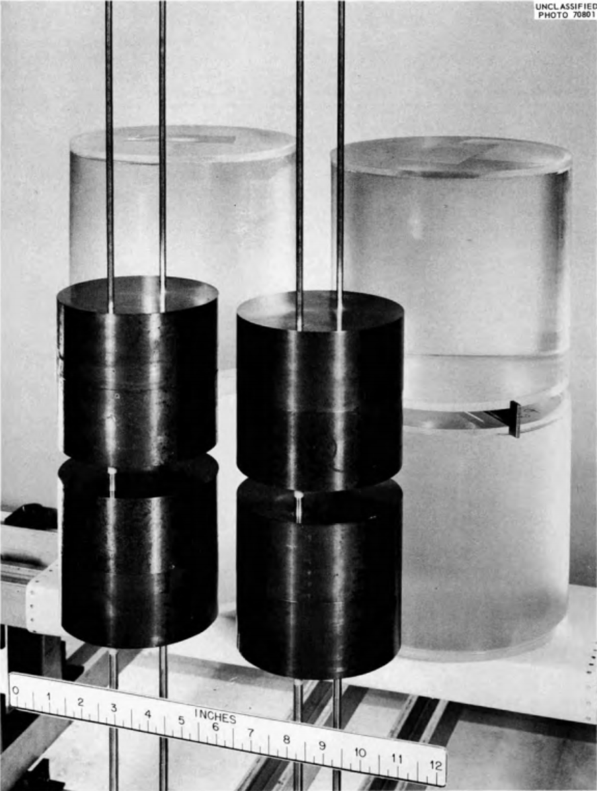
The metal units in this experiment are designated in Table II of [CSAS5Tho64]
as cylinder index 11 and reflector index 1. A photograph of the
experiment, Fig. 9 in [CSAS5Tho73], is given in Fig. 2.1.10.
=csas5 parm=(centrm)
sample problem set up 4aqueous 4 metal in csas5
v7.1-252read composition
uranium 1 0.985 300. 92235 93.2 92238 5.6 92234 1.0 92236 0.2 end
solution
mix=2
rho[uo2(no3)2]= 415. 92235 92.6 92238 5.9 92234 1.0 92236 0.5
molar[hno3]=9.783-3
temperature=300end solution
plexiglass 3 endend compositionread param
flx=yes fdn=yes nub=yes htm=no
end paramread geom
unit 1
com='uranyl nitrate solution in a plexiglas container'
cylinder 2 1 9.525 2p8.89
cylinder 3 1 10.16 2p9.525
cuboid 0 1 4p10.875 2p10.24
unit 2
com='uranium metal cylinder'
cylinder 1 1 5.748 2p5.3825
cuboid 0 1 4p6.59 2p6.225
unit 3
com='1x2x2 array of solution units'
array 1 3*0.0
unit 4
com='1x2x2 array of metal units padded to match solution array'
array 2 3*0.0
replicate 0 1 2*0.0 2*8.57 2*8.03 1
global unit 5
array 3 3*0.0end geomread array
ara=1 nux=1 nuy=2 nuz=2 fill f1 end fill
ara=2 nux=1 nuy=2 nuz=2 fill f2 end fill
gbl=3 ara=3 nux=2 nuy=1 nuz=1
com='composite array of solution and metal units'fill 4 3 end fillend arrayend dataend
Fig. 2.1.10 Critical assembly of four solution units and four metal units.
2.1.7.1.2. CSAS5 Sample problem 8: k\(_{\infty}\) for a pebble bed fuel
This problem demonstrates setting up a fuel pebble from a pebble bed
reactor, and calculating its \(k_{\boldsymbol{\infty}}\).
The pebble consists of a fuel
grain of UO2 0.025 cm in radius, coated with 0.003 cm of
pyrolytic carbon, a further coat of 0.0035 cm thick silicon carbide,
with a final coat of 0.004 cm thick pyrolytic carbon. 15000 grains are
packed with graphite into an internal fuel sphere of 2.5 cm radius clad
with a 0.5 cm thick covering of carbon and surrounded by helium. The
fuel is 8.2% enriched 235U. The pebbles are stacked into an
infinite square pitched array with a pitch of 6 cm.
This problem uses DOUBLEHET cell type, which is applicable only in the
multigroup mode of KENO calculations. Therefore, the continuous energy
version of this problem will end with an error message.
=csas5 parm=(centrm)
infinite array of pebbles on a square pitch
v7.1-252read composition' fuel kernel
u-238 1 0 2.12877e-2 293.6 end
u-235 1 0 1.92585e-3 293.6 end
o 1 0 4.64272e-2 293.6 end' inner pyro carbon
c 3 0 9.52621e-2 293.6 end' silicon carbide
c 4 0 4.77240e-2 293.6 end
si 4 0 4.77240e-2 293.6 end' outer pyro carbon
c 5 0 9.52621e-2 293.6 end' graphite matrix
c 6 0 8.77414e-2 293.6 end' carbon pebble outer coating
c 7 0 8.77414e-2 293.6 end
he-3 8 0 3.71220e-11 293.6 end
he-4 8 0 2.65156e-5 293.6 endend compositionread celldata
doublehet fuelmix=10 end
gfr=0.025 1 coatt=0.004 3 coatt=0.0035 4 coatt=0.004 5
matrix=6 numpar=15000 end grain
centrm data
ixprt=1 isn=8 nprt=2end centrm
pebble sphsquarep right_bdy=white hpitch=3.0 8 fuelr=2.5 cladr=3.0 7 end
centrm data
ixprt=1 isn=8 nprt=2end centrmend celldataread param
gen=210 npg=1000 htm=no
end paramread bounds
all=mirror
end boundsread geom
global unit 1
sphere 10 1 2.5
sphere 7 1 3.0
cuboid 8 1 6p3.0end geomend dataend
This section contains sample problems to demonstrate some of the options
available in CSAS6. A brief problem description and the associated input
data for multigroup mode of calculation are included for each problem.
The same sample problems may be executed in continuous-energy mode
by changing the library name to an continuous-energy library. See
Appendix A (Sect. 2.3) for additional examples.
The purpose of this problem is to calculate the k-effective of a system
composed of intersecting aluminum pipes, in the shape of a Y, filled
with a 5% enriched UO2F2 solution. The
UO2F2 solution at 299 K contains 907.0 gm/l of
uranium, no excess acid, and has a specific gravity of
2.0289 gm/cm3. The assembly is composed of a 212.1 cm long
vertical pipe and a second pipe that intersects the vertical pipe
76.7 cm from the outside bottom at an angle of 29.26 degrees with the
upper vertical pipe. Both pipes have 13.95 cm inner diameters and
14.11 cm outer diameters. The vertical pipe is open on the top and
1.3 cm thick on the bottom. The Y-leg pipe, in the YZ-plane, is
126.04 cm in length with the sealed end 0.64 cm thick. The assembly is
filled with solution to a height 129.5 cm above the outside bottom of
the vertical pipe. From the point where the pipes intersect, the assembly
is surrounded by water 37.0 cm in the \(\pm\)X directions, 100 cm in the
+Y direction, -37 cm in the -Y direction, to the top of the assembly in
the +Z direction, and -99.6 cm in the -Z direction.
Fig. 2.1.11 Critical assembly of UO2F2 solution in a 30\(^{\circ}\)-Y aluminum pipe.
=csas6
sample problem 1 Y-30, 5%uo2f2, 907.0g/l, 128.2, soln. ht.
v7.1-252read comp
solution
mix=1
rho[uo2f2]=907.0 92235 5.0 92238 95.0
density=?
temperature=299.0end solution
al 2 1.0 end
h2o 3 1.0 endend compread parameters
flx=yes fdn=yes far=yes pgm=yes plt=yes
end parametersread start
nst=6 tfx=0.0 tfy=0.0 tfz=0.0 lnu=1000end startread geometry
global
unit 1
com='30 deg y'
cylinder 10 13.95 135.4 -75.4
cylinder 20 14.11 135.4 -76.7
cylinder 30 13.95 125.4 0.0 rotate a2=-29.26
cylinder 40 14.11 126.04 0.0 rotate a2=-29.26
cuboid 50 2p37.0 100. -37.0 52.8 -75.4
cuboid 60 2p37.0 100. -37.0 135.4 -99.6
media 1 1 10 50
media 2 1 20 -10 -30
media 1 1 30 50 -10
media 2 1 40 -30 -20
media 0 1 10 -50
media 0 1 30 -50 -10
media 3 1 60 -20 -40 -10
boundary 60end geometryread volume
type=random batches=1000end volumeread plot
scr=yes lpi=10
ttl='y-z slice at x=0.0 through centerline of both pipes'
xul=0.0 yul=-39.0 zul=137.0
xlr=0.0 ylr=105.0 zlr=-105.0
vax=1 wdn=-1
nax=400 end plt0
ttl='x-y slice at z=26.0 slightly above point of separation'
xul=-40.0 yul=105.0 zul=26.0
xlr=+40.0 ylr=-40.0 zlr=26.0
uax=1 vdn=-1
nax=400 end plt1
ttl='x-y slice at z=75.0 well above point of separation'
xul=-40.0 yul=105.0 zul=75.0
xlr=+40.0 ylr=-40.0 zlr=75.0
uax=1 vdn=-1
nax=400 end plt2end plotend dataend
2.1.7.2.2. CSAS6 Sample problem 2: Plexiglas Cross
The purpose of this problem is to calculate the k-effective of a system
composed of intersecting Plexiglas pipes, in the shape of a cross,
filled with a 5% enriched UO2F2 solution. The room
temperature UO2F2 solution contains 896.1 gm/l of
uranium, no excess acid, and has a specific gravity of
2.015 gm/cm3. The pipes have a 13.335 cm inner diameter and
16.19 cm outer diameter. The vertical pipe is open on the top and
3.17 cm thick on the bottom. The horizontal pipe ends are 3.17 thick.
The vertical pipe is 210.19 cm in length and filled with solution to a
height of 117.2 cm. The two horizontal legs, positioned in the XZ-plane,
intersect the vertical pipe 91.44 cm from the outside bottom at an
89 degree angle with the upper section of the pipe. Each horizontal is
91.44 cm in length and filled with the above specified
UO2F2 solution. A water reflector surrounding the
solution filled pipes extends out from the point where the pipes
intersect 111.76 cm in the \(\pm\)X directions, 20.64 cm in the \(\pm\)Y directions,
29.03 cm in the +Z direction, and -118.428 cm in the -Z direction.
Fig. 2.1.12 Critical assembly of UO2F2 solution in a Plexiglas cross.
This problem models an assembly consisting of a 93.2% enriched bare
uranium sphere, 8.741 cm in radius, having a density of
18.76 gm/cm3. Problem 3 models the assembly as a single bare
sphere. The second problem models the assembly as a hemisphere with
mirror reflection on the flat surface. The next three problems model the
sphere using chords. This set of four problems is designed to illustrate
the use of multiple chords in a problem.
=csas6
sample problem 3 bare 93.2% enriched uranium sphere
v7.1-252read comp
uranium 1 den=18.76 1 293 92235 93.2 92238 5.6 92234 1.0 92236 0.2 endend compread geometry
global unit 1
sphere 10 8.741
cuboid 20 6p8.741
media 1 1 10 vol=2797.5121
media 0 1 20 -10 vol=2545.3424
boundary 20end geometryend dataend
2.1.7.2.4. CSAS6 Sample problem 4: Sphere Models Using Chords and Mirror Albedos
This problem models an assembly consisting of a 93.2% enriched bare
uranium sphere, 8.741 cm in radius, having a density of
18.76 gm/cm3. The problem models the assembly as a hemisphere
with mirror reflection on the flat surface.
=csas6
sample problem 4 bare 93.2% U sphere, hemisphere w/ mirror albedo
v7.1-252read comp
uranium 1 den=18.76 1 293 92235 93.2 92238 5.6 92234 1.0 92236 0.2 endend compread geometry
global unit 1
sphere 10 8.741 chord +x=0.0
cuboid 20 8.741 0.0 8.741 -8.741 8.741 -8.741
media 1 1 10 vol=2797.5121
media 0 1 20 -10 vol=2545.3424
boundary 20end geometryread bounds
-xb=mirror
end boundsend dataend
2.1.7.2.5. CSAS6 Sample problem 5: Sphere Models Using Chords and Mirror Albedos
This problem models an assembly consisting of a 93.2% enriched bare
uranium sphere, 8.741 cm in radius, having a density of
18.76 gm/cm3. The problem models the assembly as a quarter
sphere with mirror reflection on the two flat surfaces.
=csas6
sample problem 5 bare 93.2% U sphere, quarter sphere w/ mirror albedo
v7.1-252read comp
uranium 1 den=18.76 1 293 92235 93.2 92238 5.6 92234 1.0 92236 0.2 endend compread geometry
global unit 1
sphere 10 8.741 chord +x=0.0 chord +y=0.0
cuboid 20 8.741 0.0 8.741 0.0 8.741 -8.741
media 1 1 10 vol=2797.5121
media 0 1 20 -10 vol=2545.3424
boundary 20end geometryread bounds
-xy=mirror
end boundsend dataend
2.1.7.2.6. CSAS6 Sample problem 6: Sphere Models Using Chords and Mirror Albedos (Eighth Sphere)
This problem models an assembly consisting of a 93.2% enriched bare
uranium sphere, 8.741 cm in radius, having a density of
18.76 gm/cm3. The problem models the assembly as an eighth
sphere with mirror reflection on the three flat surfaces.
=csas6
sample problem 6  bare 93.2% U sphere, eighth sphere w/ mirror albedo
v7.1-252
read comp
  uranium  1 den=18.76 1 293 92235 93.2 92238 5.6 92234 1.0 92236 0.2 end
end comp
read geometry
  global unit 1
    sphere 10  8.741  chord +x=0.0  chord  +y=0.0  chord +z=0.0
    cuboid   20  8.741 0.0 8.741 0.0 8.741 0.0
    media  1 1 10      vol=2797.5121
    media  0 1 20 -10  vol=2545.3424
    boundary 20
end geometry
read bounds
  -fc=mirror
end bounds
end data
end
2.1.7.2.7. CSAS6 Sample problem 7: Grotesque without the Diaphragm
The purpose of this problem is to calculate the keff of a system
composed of eight enriched uranium units placed on a diaphragm, with an
irregularly shaped centerpiece positioned in the center hole of the
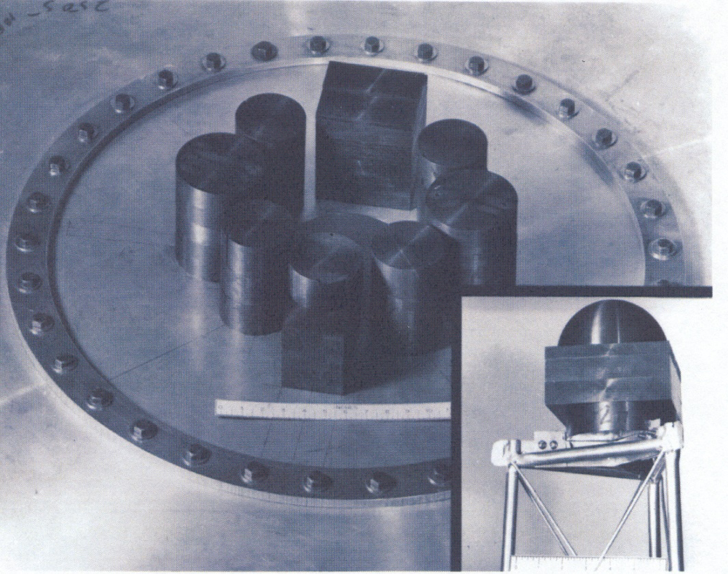
diaphragm [CSAS5Mih99]. The assembly and centerpiece are shown in Fig. 2.1.13,
which is Fig. 4 from [CSAS5Mih99]. The eight units consist of an approximate
parallelepiped with an irregular top, a parallelepiped, and
six cylinders of various sizes. The centerpiece, which penetrates the
hole in the diaphragm, consists of a cylinder topped by a parallelepiped
topped by a hemisphere. The diaphragm is not modeled in this example.
=csas6
sample problem 7 keno-vi grotesque w/o diaphragm, ornl/csd/tm-220
v7.1-252read comp
uranium 1 den=18.76 1 293 92235 93.2 92238 5.6 92234 1.0 92236 0.2 end
uranium 2 den=18.76 1 293 92235 93.2 92238 5.6 92234 1.0 92236 0.2 end
uranium 3 den=18.76 1 293 92235 93.2 92238 5.6 92234 1.0 92236 0.2 end
uranium 4 den=18.76 1 293 92235 93.2 92238 5.6 92234 1.0 92236 0.2 end
uranium 5 den=18.76 1 293 92235 93.2 92238 5.6 92234 1.0 92236 0.2 end
uranium 6 den=18.76 1 293 92235 93.2 92238 5.6 92234 1.0 92236 0.2 end
uranium 7 den=18.76 1 293 92235 93.2 92238 5.6 92234 1.0 92236 0.2 end
uranium 8 den=18.76 1 293 92235 93.2 92238 5.6 92234 1.0 92236 0.2 end
uranium 9 den=18.76 1 293 92235 93.2 92238 5.6 92234 1.0 92236 0.2 end
uranium 10 den=18.76 1 293 92235 93.2 92238 5.6 92234 1.0 92236 0.2 end
uranium 11 den=18.76 1 293 92235 93.2 92238 5.6 92234 1.0 92236 0.2 end
uranium 12 den=18.76 1 293 92235 93.2 92238 5.6 92234 1.0 92236 0.2 end
uranium 13 den=18.76 1 293 92235 93.2 92238 5.6 92234 1.0 92236 0.2 end
uranium 14 den=18.76 1 293 92235 93.2 92238 5.6 92234 1.0 92236 0.2 endend compread param
pgm=yes plt=yes
end paramread geom
global unit 1'*** one through three is item 1 in drawing 84-10649 ornl/csd/tm-220 ***'one top piece of item 1
cuboid 10 2p6.3515 1.2685 -3.8115 13.377 13.058 origin y=-17.464 z=0.15 rotate a2=-1.35'two middle piece of item 1
cuboid 20 2p6.3515 6.3515 -3.8115 13.058 11.155 origin y=-17.464 z=0.15 rotate a2=-1.35'three bottom piece of item 1
cuboid 30 4p6.3515 11.155 0. origin y=-17.464 z=0.15 rotate a2=-1.35'*** four is item 2 in drawing 84-10649 ornl/csd/tm-220 ***
cylinder 40 4.555 12.918 0. origin x=-12.176 y=-9.343 z=0.111 rotate a1=-52.5 a2=-1.400'*** five is item 3 in drawing 84-10649 ornl/csd/tm-220 ***
cylinder 50 5.761 13.475 0. origin x=-16.333 y=1.681 z=0.174 rotate a1=83.5 a2=+1.173'*** six is item 4 in drawing 84-10649 ornl/csd/tm-220 ***
cylinder 60 4.5525 12.969 0. origin x=-9.539 y=11.168 z=0.156 rotate a1=40.5 a2=+1.970'*** seven and eight are item 5 in drawing 84-10649 ornl/csd/tm-220 ***'seven
cuboid 70 2p3.81 8.13 -4.573 8.91 0. origin y=15.698 z=0.290 rotate a2=+2.58'eight
cylinder 80 4.573 13.229 8.91 origin y=15.698 z=0.290 rotate a2=+2.58'*** nine is item 6 in drawing 84-10649 ornl/csd/tm-220 ***
cylinder 90 4.5545 12.974 0. origin x=9.854 y=10.964 z=0.134 rotate a1=-42.0 a2=+1.680'*** ten is item 7 in drawing 84-10649 ornl/csd/tm-220 ***
cylinder 100 5.7495 13.475 0. origin x=16.388 y=1.434 z=0.140 rotate a1=-86.0 a2=+1.400'*** eleven is item 8 in drawing 84-10649 ornl/csd/tm-220 ***
cylinder 110 4.5565 12.954 0. origin x=12.029 y=-9.398 z=0.087 rotate a1=38.0 a2=-1.100'*12 through 14 is the centerpiece in drawing 84-10649 ornl/csd/tm-220'twelve
cylinder 120 5.757 2.690 0. origin x=-0.593 y=-0.593 z=-1.753'thirteen
cuboid 130 4p6.35 5.718 0. origin z=0.937'fourteen
sphere 140 6.082 chord +z=0. origin x=-0.268 y=0.268 z=6.655'*** fifteen is the system boundary ***'fifteen
cuboid 150 4p25.0 15.0 -2.0
media 1 1 +10 vol=20.58546556
media 2 1 +20 -10 vol=245.678420867
media 3 1 +30 -20 vol=1800.040061395
media 4 1 +40 vol=842.019046637
media 5 1 +50 vol=1404.99376489
media 6 1 +60 vol=844.415646269
media 7 1 +70 vol=862.4600226
media 8 1 +80 -70 vol=283.749744681
media 9 1 +90 vol=845.483582679
media 10 1 +100 vol=1399.390119093
media 11 1 +110 vol=844.921798001
media 12 1 +120 -130 vol=280.088070346
media 13 1 +130 vol=922.25622
media 14 1 +140 -130 vol=471.191948666
media 0 1 150 -10 -20 -30 -40 -50 -60 -70 -80 -90 -100-110 -120 -130 -140 vol=31432.726088316
boundary 150end geomread plot
scr=yes lpi=10
clr= 1 255 0 02 0 0 2053 0 229 2384 0 238 05 205 205 06 255 121 1217 145 44 2388 150 150 1509 240 200 22010 0 191 25511 224 255 25512 0 128 6413 255 202 14914 255 0 128end color
ttl='grotesque x-y slice at z=0.5'
xul=-25.5 yul= 25.5 zul=0.5
xlr= 25.5 ylr=-25.5 zlr=.5
uax=1 vdn=-1 nax=800 end
ttl='grotesque x-y slice at z=2.0'
xul=-25.5 yul= 25.5 zul=2
xlr= 25.5 ylr=-25.5 zlr=2 end
ttl='grotesque x-y slice at z=9.5'
xul=-25.5 yul= 25.5 zul=9.5
xlr= 25.5 ylr=-25.5 zlr=9.5 end
ttl='grotesque y-z slice at x=-0.593'
xul=-.593 yul=-25.5 zul=15.5
xlr=-.593 ylr= 25.5 zlr=-3.5
uax=0 vax=1
vdn=0 wdn=-1 nax=800 end
ttl='grotesque x-z slice at y=0.0'
xul=-25.5 yul=0.0 zul=15.5
xlr= 25.5 ylr=0.0 zlr=-3.5
uax=1 vax=0 wax=0
udn=0 vdn=0 wdn=-1 nax=800 end
ttl='grotesque x-z slice at y=12.125'
xul=-25.5 yul=12.125 zul=15.5
xlr= 25.5 ylr=12.125 zlr=-3.5
uax=1 vax=0 wax=0
udn=0 vdn=0 wdn=-1 nax=800 end
ttl='grotesque x-z slice at y=-12.000'
xul=-25.5 yul=-12.000 zul=15.5
xlr= 25.5 ylr=-12.000 zlr=-3.5
uax=1 vax=0 wax=0
udn=0 vdn=0 wdn=-1 nax=800 endend plotend dataend
2.1.7.2.8. CSAS6 Sample problem 8 Infinite Array of MOX and UO2 Assemblies
The purpose of this problem is to calculate the keff of a system
composed of an infinite array of MOX assemblies interspersed between
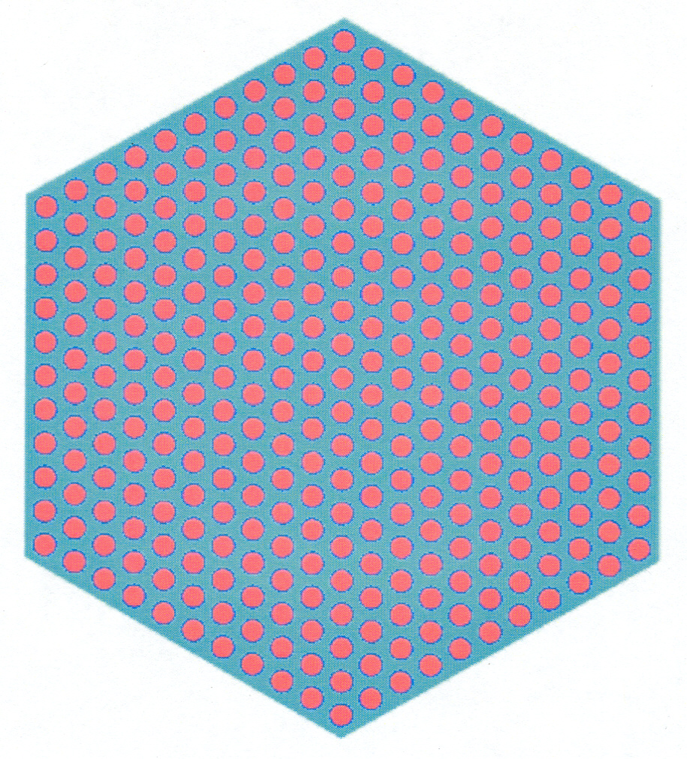
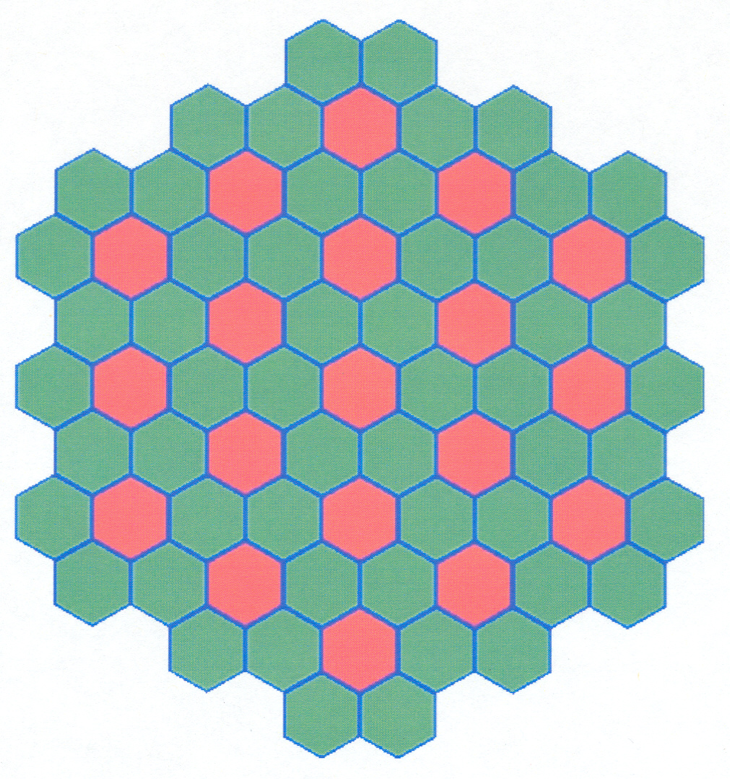
UO2 assemblies. Both assembly types contain 331 pins in a
hexagonal lattice with a pin pitch of 1.275 cm and an assembly pitch
of 23.60 cm as shown in
Fig. 2.1.14. The moderator is borated water at 306\(^{\circ}\)C having a density
of 0.71533 gm/cc and composed of 99.94 wt % H2O and
0.06 wt % natural boron. Each fuel rod is 355 cm in length, has a
radius of 0.3860 cm, 0.722-cm-thick Zr cladding with no gap, and is at
a temperature of 754\(^{\circ}\)C.
The UO2 fuel consists of 4.4 wt % 235U and 95.6 wt %
238U at a density of 8.7922 gm/cc. The UO2 fuel also
contains 9.4581E-9 atoms/b-cm of 135Xe and 7.3667E-8 atoms/b-cm
of 149Sm.
The MOX fuel consists of 96.38 wt % UO2 and
3.62 wt % PuO2 at a density of 8.8182 gm/cc. The UO2
fuel is composed of 2.0 wt % 235U and
98.0 wt % 238U. The PuO2 fuel is composed of
93.0 wt % 239Pu, 6.0 wt % 240Pu- and
1.0 wt % 241Pu. The MOX fuel also contains 9.4581E-9
atoms/b-cm of 135Xe and 7.3667E-8 atoms/b-cm of 149Sm.
These two assemblies are placed so they represent an infinite array in
the X and Y dimensions as shown in Fig. 2.1.15. There is 20 cm of water
above and below fuel assemblies. This problem uses CENTRM/PMC as the
resolved resonance processor cross section. Since an infinite array
cannot be explicitly modeled, a section of the array is modeled and the
X and Y sides have mirror reflection.
J. T. Mihalczo. Brief summary of unreflected and unmoderated cylindrical critical experiments with oralloy at Oak Ridge. Technical Report, Oak Ridge National Laboratory, Oak Ridge, TN (USA), 1999.
J. T. Thomas. CRITICAL THREE-DIMENSIONAL ARRAYS OF NEUTRON-INTERACTING UNITS. PART II. U (93.2) METAL. Technical Report, Oak Ridge National Laboratory, Oak Ridge, TN (USA), 1964.
Joseph T. Thomas. Critical three-dimensional arrays of U (93.2)-metal cylinders. Nuclear Science and Engineering, 52(3):350–359, 1973. Publisher: Taylor & Francis.