2.2. CSAS-Shift: Criticality Safety Analysis Sequence with Shift
K. B. Bekar, G. Davidson, B. Langley, B.J. Marshall
The CSAS-Shift sequence integrates the Shift advanced Monte Carlo solver into the
CSAS framework as an alternative to the KENO transport solvers to
perform reliable and efficient eigenvalue calculations for criticality
safety and reactor physics analysis. It supports both KENO V.a and
KENO-VI geometries and provides most widely used KENO
capabilities available in the CSAS5 and CSAS6 sequences for both multigroup
and continuous-energy transport modes. The highly scalable Shift
Monte Carlo solver enables faster solutions when running on
multiple cores, and it shows better performance to achieve the same
level of accuracy compared to the CSAS sequences with the KENO codes.
The CSAS-Shift sequence was designed to provide the modeling and simulation
capabilities required for criticality safety and reactor physics analysis
through the Shift Monte Carlo solver.
Shift is a massively parallel
Monte Carlo radiation transport package in the Exnihilo radiation
transport code suite [CSAS-ShiftPJE+16], [CSAS-ShiftESSC10].
Shift was developed including features such as support for
both fixed-source and eigenvalue Monte Carlo transport capabilities with
multiple geometry and physics engines, hybrid capabilities for
variance reduction methods, and advanced parallel decompositions
to scale well from laptops to small computing clusters to
advanced supercomputers. Shift supports different geometry engines,
including the Oak Ridge Adaptable Nested Geometry Engine (ORANGE)
designed to provide particle transport capabilities on both KENO V.a
and KENO-VI geometries as well as geometry visualization
capabilities in the Fulcrum user interface. Shift with both
versions of KENO geometries performs eigenvalue calculations in both
continuous-energy and multigroup modes. Shift supports most widely used
primary capabilities available with the KENO codes and provides
some unique capabilities with ORANGE such as modeling randomly
packed media and efficient parallel calculations for volume estimates.
CSAS-Shift provides all capabilities for both multigroup
and continuous-energy transport modes.
Like the CSAS5 and CSAS6 implementation, in the multigroup
calculation mode, CSAS-Shift sequences automate the
processing of the cross sections for temperature corrections and
problem-dependent resonance self-shielding for utilization in multigroup
neutron transport calculations using SCALE’s cross section
processing module, XSProc. If continuous-energy calculation mode
is selected, no resonance processing is needed, and the continuous-energy
cross sections are used directly in the Shift code, with
temperature corrections provided as the cross sections are loaded.
CSAS-Shift with the highly scalable Shift solver enables some
unique capabilities and faster solutions when running on
multiple cores, and it shows better performance to achieve the same
level of accuracy compared to the CSAS sequences with the KENO codes.
CSAS-Shift input requirements, supported and unsupported
capabilities, and input and output details are described in the following
sections.
CSAS-Shift’s design is aimed to make a smooth transition between
KENO codes to the Shift transport code. Therefore, the original input
data layout available in CSAS sequence with the KENO transport codes
was kept the same for the CSAS sequence with Shift transport.
CSAS-Shift uses the same CSAS5 and CSAS6 inputs, the only input
modification that should be required is changing the sequence
name by appending -shift to the sequence name, as shown in
Example 2.2.1.
Like CSAS sequences with KENO codes, CSAS-Shift
sequences are named with the KENO geometry that they
support: CSAS5-Shift for the models with KENO V.a
geometry, and CSAS6-Shift for the models with KENO-VI geometry.
Example 2.2.1 CSAS sequence inputs with KENO and Shift transport
In the CSAS-Shift sequence framework, SCALE data handling is automated
as much as possible. Similar to many other SCALE sequences, CSAS-Shift
also applies a standardized procedure to provide appropriate number
densities and cross sections for the calculation.
XSProc is responsible for reading the standard composition data and
other engineering-type specifications—including volume fraction or
percent theoretical density, temperature, and isotopic distribution,
as well as the unit cell data. XSProc then generates number densities
and related information, prepares geometry data for resonance
self-shielding and flux-weighting cell calculations,
and (if needed) provides problem-dependent multigroup cross section
processing.
Sequences that execute Shift transport include a
data processor named ExnihiloInputBuilder to read and check
the KENO data. This data processor processes the KENO data
and creates a ParameterList input used by Shift
to construct the problem and perform transport calculations.
When the data checking has been completed, the CSAS-Shift
sequence executes XSProc to prepare a resonance-corrected
macroscopic cross section library in the AMPX working library
format for the subsequent Shift transport calculation
if a multigroup library has been selected.
Similar to CSAS sequences with KENO transport, the CSAS-Shift sequence
supports both CELLMIX and Double-het capabilities. For each unit
cell specified as being cell-weighted, XSProc performs the
necessary calculations and produces a cell-weighted macroscopic
cross-section library. Shift may be executed to calculate the
k-effective, or neutron multiplication factor, using the
cross section library that was prepared by the control sequence.
Computational capabilities available in CSAS sequences with KENO
codes—including the determination of k-effective,
flux densities, fission densities, mesh tallies, Shannon entropy
tally, problem-dependent continuous-energy temperature
treatments, parallel calculations, and many more—are also
provided by the CSAS-Shift sequence.
CSAS-Shift also supports two new CSAS sequence data blocks,
definitions and tallies data, to allow flexible definition
and output control of mesh tallies. The mesh responses
neutron flux, fission rate, and fission source can now
be requested multiple times on different spatial and
energy grids in the same calculation. This capability
helps users efficiently manage computational resources
when collecting detailed information, depending
on their requirements.
Criticality safety tools in SCALE attain some unique capabilities
provided by Shift with the new geometry engine ORANGE, such as
parallel volume estimates for KENO-VI geometric regions and
modeling randomly packed media, which is enabled by implementing
a random-packing algorithm to place spherical particles within simple
bounding geometries. This capability allows constructing tristructural isotropic
(TRISO) particle models for advanced reactor modeling and simulation
activities. See Sect. 2.2.4.1.2.1 for further details.
Details for some of these capabilities, their input methods, and output edits
are provided in the following sections.
Some of the limitations of the CSAS-Shift multigroup sequences are a
result of using preprocessed multigroup cross sections. Inherent
limitations in multigroup CSAS-Shift calculations are as follows:
Spatial effects such as fuel rods in assemblies where
some positions are filled with control rod guide tubes, burnable
poison rods, and/or fuel rods of different enrichments. The
cross sections are processed as if the rods are in an infinite
lattice of identical rods. If the user inputs a Dancoff factor for
the cell (such as one computed by MCDancoff), XSProc can produce an
infinite lattice cell which reproduces that Dancoff. This can
mitigate some spatial lattice effects.
The continuous-energy cross sections are directly used in Shift. An
existing multigroup input file can easily be converted to a continuous-energy
input file by simply specifying the continuous-energy library. In
this case, all cell data is ignored. However, the following limitations
exist:
If CELLMIX is defined in the cell data, the problem will not run in
continuous-energy mode. CELLMIX implies new mixture cross
sections are generated using XSDRNPM-calculated cell fluxes; therefore
it is not applicable in continuous-energy mode.
Problems with DOUBLEHET cell data are not allowed, as they inherently
utilize the CELLMIX feature.
Although Shift Monte Carlo code was designed with several advanced capabilities,
it does not currently support some of the unique features available in KENO
codes. Therefore, CSAS-Shift does not provide some of the capabilities available
in CSAS5 and CSAS6 sequences.
The missing capabilities are mostly considered as the outdated features
or those seldomly used by CSAS users in their analysis. The equivalent capabilities
will be activated in the Shift transport code in the next SCALE release, depending
on the need basis.
Table 2.2.1 summarizes the capabilities
currently supported by CSAS with KENO codes but not supported by CSAS-Shift
sequences.
Adjoint transport capability is not available in Shift
Prompt-only
\(nu\)
parameter PNU
Shift does not support using prompt neutron spectrum only
in continuous-energy mode
Use unionized
mixture cross
section
parameter UUM
Shift does not support KENO-like mechanism to store
cross sections on a material-based unionized energy grid
for a faster cross section lookup in continuous-energy
mode
Although this method benefits for faster runtimes for some
KENO models, storing all data may require prohibitively
large amount of memory for problem with a large number of
materials. Different approaches are being developed in
Shift transport, and some experimental implementation is
available in CSAS-Shift. See
Table 2.2.4 for more details.
An alternative k-effective calculation method available in
KENO codes are not supported by Shift.
Start data types
2, 3, 4, 5 and 9
startdata block
NST= 2, 3, 4, 5, and
9
Start data types 2 - 5 have not been implemented
by ORANGE geometry engine used by Shift transport.
Start type 9 designed to read starting distribution from a
mesh source file is not currently supported by CSAS-Shift.
Biasing or
weighting data
biasdata block
KENO-like biasing capability is not currently supported by
Shift transport.
Periodic and White
Albedo boundary
conditions
boundsdata block
Shift transport does not currently support PERIODIC and
WHITE boundary conditions for both KENO V.a and KENO-VI
geometries.
Differential Albedos
boundsdata block,
PAX in
parameterdata block
Material specific albedos available with KENO multigroup
transport is not supported by Shift multigroup transport
LOOP construct in
array data
arraydata block
LOOP construct in array data input block is not supported
by ORANGE geometry engine as part of Shift code.
Volume calculation
(random sampling)
type=RANDOM in
volumedata block
Random volume estimates for KENO-VI geometry is not
available in ORANGE geometry engine used by Shift transport
Accumulate mesh
fluxes
parameter MFX
Shift does not support to tally mesh fluxes which are
averaged over the region volumes in each mesh voxel.
Compute and print
mean free paths
parameter MFP
This capability is not currently implemented in Shift.
Region-dependent
fissions and
absorptions
parameters FAR and
GAS
Although these tallies are available in Shift transport
they are not currently implemented in CSAS-Shift.
Mixture-dependent
reaction tallies
reactiondata block
Although these tallies are available in Shift transport
they are not currently implemented in CSAS-Shift.
Time controlled
termination
parameter TME
Shift does not have job termination capability controlled
by the user-defined time limit.
Terminate execution
on user signal
by creating a file named
stop_keno in the
working directory
CSAS-Shift does not support this capability
Restart capability
parameters RES,
BEG, APP,
RST, WRS
Restart capability is not available in Shift
Print particle
tracks
parameter TRK
Although Shift has its own mechanisms to print information
about each particle history, this capability is not fully
integrated in CSAS-Shift sequence. It will be available
in next releases.
Problem
Characterization
Output Edit
always ON
CSAS-Shift implements the nu bar, average fission group
energy of the average lethargy causing fission and system
mean free path in this output edit. Lifetime and generation
time are not currently available.
Plots of avg.
k-effective and
Shannon entropy
always ON
CSAS-Shift does not produce char-plots for the average
k-effective by generations run, the k-effective by
generations skipped, and Shannon entropy per generation.
Instead of the char-plots, CSAS-Shift creates Ptolemy
plots and stores them in a dedicated plot directory.
Fulcrum may be used to visualize these plots. See
Sect. 2.2.6.1.13
Summary of Source
Convergence
Diagnostics
parameter SCD
CSAS-Shift does not perform the posterior entropy tests
available in KENO. Instead, result of a single test
performed by Shift is captured and printed in the relevant
output section.
Print capabilities
for mixed cross
section
parameters AMX,
XS1, XS2, PKIP1D, XAP, XSL
Currently, no capability is available to print the cross
sections used by Shift transport.
Flux moments and
angular flux calc.
parameters TFM,
PMF, PMM
CSAS-Shift does not support any of these capabilities.
Print starting
points
PSP parameter
in startdata
This capability is not currently implemented in CSAS-Shift
Plot capability
parameter PLTplotdata block
Old-style plotting capabilities available in KENO codes
are not supported. Fulcrum can be used for geometry
visualization.
HTML output
parameter HTM
Old-style HTML-based output method is not supported.
This section describes the input data required for the CSAS-Shift
sequence. A typical CSAS6-Shift input, shown in
Example 2.2.2, starts
with the sequence identifier always preceded by the = sign, and
it is followed by the problem title. Then, a cross section library
name is specified, and all these entries are followed by several
data blocks each starting with READ data_block and
ending with END data_block.
Example 2.2.2 A typical CSAS-Shift sequence input
  =CSAS6-Shift parm=(parm_options)
  problem title

  ' ----- XSProc data
  ' cross section library name (REQUIRED)
  ce_v7.1

  ' List of material specifications in standard SCALE format (REQUIRED)
  read composition
     ...
  end composition

  ' Specify data for resonance processing (OPTIONAL)
  read celldata
     ...
  end celldata

  ' ---- New CSAS sequence data blocks

  ' Used to define energy bounds and grid geometries for
  ' the tallies defined in tallies data block
  ' (REQUIRED if tallies data block exists)
  read definitions
     ...
  end definitions

  ' Used to define tallies in a more robust way (OPTIONAL)
  read tallies
     ...
  end tallies

  ' ---- KENO transport data
  ' Specify the problem geometry (REQUIRED)
  read geometry
     ...
  end geometry

  ' Other input data blocks (OPTIONAL)
Because CSAS-Shift uses the same input data used by CSAS5 and CSAS6,
details of the input data blocks, compositions, celldata, definitions,
and tallies will not be repeated here, and they can be seen in Sect. 2.1.4.
Data blocks in the KENO transport data category will be discussed
in the following section.
Note
For CSAS-Shift, the grid boundaries must be inside the specified geometry,
while CSAS-KENO permits grid boundaries beyond the geometry.
Table 2.2.2
presents the lists of the KENO input data blocks supported by CSAS-Shift
sequence. The input method in some data blocks may show some minor differences
between the CSAS-KENO and CSAS-Shift sequences. Similarly, some capabilities
provided by each input block also have some differences. All these details
are discussed in this section. KENO input data blocks, that are
reactiondata,
biasdata, mixtdata, and plotdata, are not currently
supported by the CSAS-Shift sequences.
Table 2.2.2 Summary of KENO input data blocks available in CSAS-Shift sequences.
The data in this block will be ignored in the calculations
Bias data
Not available
Execution will be terminated.
Reaction data
Not available
The data in this block will be ignored in the calculations
Mixt data
Not available
The data in this block will be ignored in the calculations
* Must precede all other data blocks in this table.
Similar to CSAS5 and CSAS6, geometrydata is the only KENO
data block required to perform Shift transport calculation as part of the CSAS-Shift
sequence. Other data blocks are optional, and the same default values
listed in various locations in Sect. 8.1 are also applied to the
data in each data block in CSAS-Shift. Note that parameter data must
precede all other KENO data blocks if it is entered.
When CSAS-Shift is run with a user input including
biasdata block, the execution will be terminated with the error
message given in Example 2.2.3.
Note that CSAS-Shift ignores the data entered in the unsupported
plotdata, mixtdata, and reactiondata blocks and
continues the calculation. User is notified with a warning message as
shown in Example 2.2.4.
Example 2.2.3 Error message printed by CSAS-Shift output when biasingdata is found in user input.
      ***Error: Failed to run ExnihiloModule with assertion:
      ----------------------------------------------
       These input cards are unsupported by Shift.
      ----------------------------------------------
       They must be removed from the input to run.
      ----------------------------------------------
       line: 19   column: 1   biasing
      ----------------------------------------------


       ^^^ at /ornldev/code/Scale/S63/Source/packages/Module/Exnihilo/InputProcessorBase.cpp:193
Example 2.2.4 A typical warning message printed by CSAS-Shift output when an unsupported data block is found in user input.
  ====================================================================================================
  Input Warnings:
  ====================================================================================================

  ***Warning: Plot block found. This is not currently supported by Shift and will be ignored for now.
Note
CSAS5-Shift and CSAS6-Shift also support PARM=CHECK or PARM=CHK sequence parm
options. This will allow checking the input data without
performing cross section calculation as well as Shift transport
calculations.
The KENO parameter data block in both CSAS5 and CSAS6 sequences provides many
control parameters to activate the capabilities available in KENO transport
for the problem being run. CSAS-Shift supports only a subset of these
parameters, as listed in Table 2.2.3.
Detailed description of these parameter can be seen in Sect. 8.1.3.3.
Parameters entered in the parameterdata input block are processed by
CSAS-Shift sequence implementation, and then the ParameterList input
is updated to accordingly activate/deactivate the equivalent capabilities
with Shift transport if the asking feature is currently supported by Shift.
CSAS-Shift usually ignores the unsupported parameters by notifying the user
with a warning message, and then it continues the calculation. For some
specific parameters, code can terminate the execution and ask the user to
remove this parameter from the input and rerun the code for a successful
calculation.
Caution
CSAS-Shift notifies users of the unsupported parameters
with a warning message before Numeric and Logical Parameters
edit in the output, and then it ignores this parameter. It is the user’s
responsibility to examine which input parameter is ignored in the
current calculation.
Note
CSAS-Shift defaults the value of a parameter, which is currently
supported but not defined in the parameterdata input block, to the KENO
default. In other words, both CSAS and CSAS-Shift use the same defaults
for the same parameters.
Table 2.2.3 Summary of KENO parameters currently supported by CSAS-Shift
Table 2.2.4 Summary of parameters available only in CSAS-Shift
PARAMETERS:
KEY
DEFAULT
DEFINITION
PN_ORDER=
5
Legendre polynomial order
DOUBLE_INDEXING=
0.0
Accelerate xsec calculation using double indexing
THINNING_TOLERANCE=
0.0001
Tolerance to use thinning the unionized xsec grid
In CSAS5 and CSAS6, users can control the number of scattering angles
in multigroup calculations by entering the SCT parameter in the KENO
mixingdata block. The similar capability in CSAS-Shift was
provided by adding a new parameter, PN_ORDER=, to the parameterdata
block because the mixingdata block is not supported by CSAS-Shift sequences.
Its default is set as 5.
Another new capability in CSAS-Shift is the automatic placement of
units within another unit. This capability is currently limited to the
stochastic placement of spherical geometries without clipping within another
geometry. Additional options such as the automatic placement in lattice structures
and the extension to other geometries is planned for future SCALE releases.
This new capability is enabled through a new input block named randomgeom.
The randomgeom block is composed of randommix specifications which is
again composed of key/value pairs. The basic structure of the randomgeom
block and the randommix specifications is as follows:
Example 2.2.5 New randomgeom data block in CSAS-Shift
read randomgeom
RANDOMMIX = ID
TYPE=random
UNITS= U1 U2 ... UN end
PFS= pf1 pf2 ... pfN end
CLIP= no
SEED= int
end RANDOMMIXend randomgeom
with
RANDOMMIX - keyword with ID number or name
TYPE - distribution type of units (currently limited to random)
UNITS - list of unit number(s) to be distributed in geometry
PFS - fraction of volume occupied by units U1...UN
CLIP - boundary clipping (currently limited to no)
SEED - random seed for random placement
Similar to the array block, this input block requires that the unit
specified as part of a randommix in the units list must exist in the geometry.
An additional requirement is that the the units must have a spherical outer boundary.
The PF list must have the same length as the units list. The sum of the values
listed in PFS must be less than 1.0. In practice, the actual limit to the
total PF depends on the size and number of the units specified by the user.
The TYPE keyword specifies the distribution of the units within the geometry.
The type is currently limited to random which will call a stochastic
placement algorithm to randomly distribute the units in the geometry.
The CLIP keyword controls the clipping of the units along the geometry in
which they are placed. This is currently limited to no, that is the units
are not clipped by the geometry. The SEED keyword is specifying the random
seed used for the stochastic distribution of units. This assures the same random
distribution if the input is run multiple times.
Note
Given the stochastic algorithm that is currently called by the randommix
block, in practice total packing fractions of up to approximately 20% are achieved.
A “fill” material—the interstitial media surrounding the random spherical
geometry units—is not present in the randomgeom block. Instead, the fill
media is handled in the unit specification within the KENO geometry
block of the input file: A region in a unit is filled with both a media and a
randommix record. Then the media is filling the space of the region that is
not occupied by units placed through the units defined in the randommix record.
A randommix block can be used in multiple different units with varying fill
materials. The basic unit format along with a randommix on the media record itself is as follows:
Note
A randommix can currently be filled only into regions that have
an outer boundary of a sphere, cuboid, or cylinder.
read randomgeom
randommix=ID
...
end randommixend randomgeomread geometry
...
unit U
surfaces ...
media ...
media F biasID surfaces randommix=ID
boundary S
...
end geometry
In the sample case shown in Example 2.2.6, a single
pebble is filled with a single TRISO particle type.
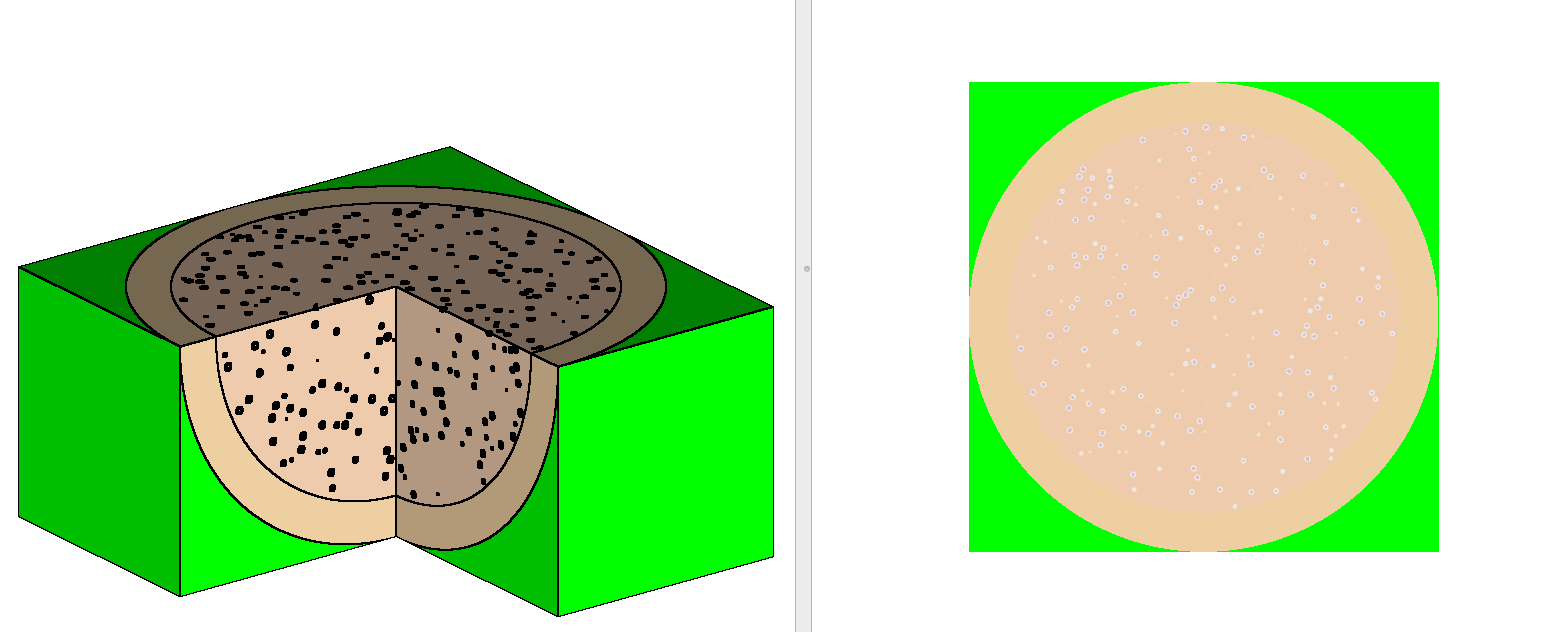
Fig. 2.2.1 shows how TRISO particles are placed in
a single pebble with the randomgeom capability. The individual location of
particles is written in the Shift Hierarchical Data Format (HDF5) output file,
so these locations can be used for verification or other purposes as needed.
CSAS-Shift supports only START types 0, 1, 6, 7, and 8.
CSAS-Shift start data implementation does not currently
support the PSP option, which is used to print
source positions sampled by the Shift transport.
Implementations for start types 0, 1, 7, and 8 in CSAS-Shift are
are similar to those in CSAS5 and CSAS6. However,
there are some minor differences in start type 6.
In KENO start type 6 implementation, the following rules are applied
when selecting the starting points (see Sect. 8.1.4.8 and Sect. 8.1.3.3
for more details).
Start NPG initial fission neutrons at first-NPG starting
points defined by start type 6 data if NPG < LNU. Remaining
starting points beyond NPG will be discarded.
Start NPG initial fission neutrons at LNU starting points
defined by start type 6 data if NPG = LNU.
Start LNU initial fission neutrons at the starting points
defined by start type 6 data, then randomly select the
remaining fission source points (NPG-LNU) from these
starting points if NPG > LNU.
where LNU, a start type 6 data parameter, is the total
number of starting points specified in the start data block;
and NPG, a parameter in the parameter data block, is
the number of neutrons per generations.
Unlike KENO, the CSAS-Shift input processor does not follow
the above rules when selecting positions for the initial
fission neutrons. It calculates the probability of each point
being selected and passes all starting points with this
information to the
Shift module. The Shift module always samples NPG initial
fission source points using these data.
For example, the KENO code processes the following input and
then samples the initial fission points.
=csas6 parm=bonami
Godiva test problem
test-8grp
read composition
u-234 1 0 0.000491995 300 end
u-235 1 0 0.0449996 300 end
u-238 1 0 0.002498 300 endend compositionread parameter
htm=no gen=10 npg=15end parameterread geometry
global unit 1
sphere 1 8.67
media 1 1 1
boundary 1end geometryread start
nst=6 ps6=yes psp=yes
tfx=1.0 tfy=1.0 tfz=1.0 lnu=5
tfx=2.0 tfy=2.0 tfz=2.0 lnu=20end startend dataend
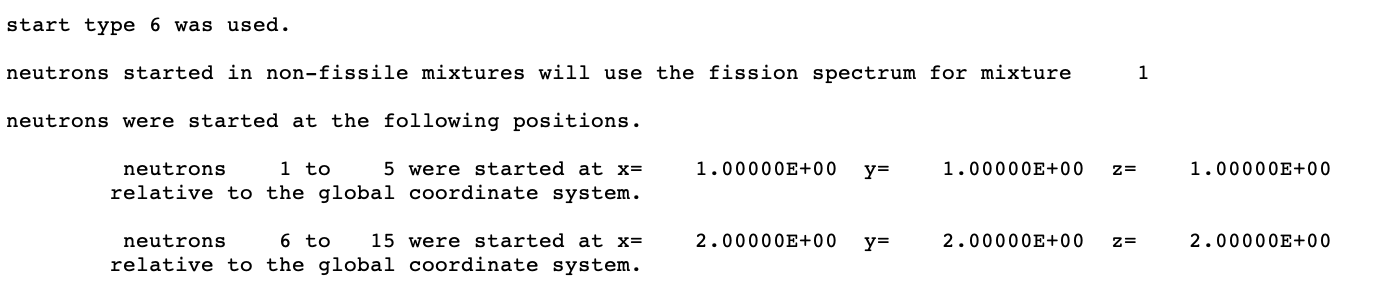
The summary of the
sampling process is printed in KENO output, as shown in
Fig. 2.2.2. KENO first starts 5
neutrons at (1.0, 1.0, 1.0) and the remaining 10 neutrons
at (2.0, 2.0, 2.0) since LNU=20 > NPG=15.
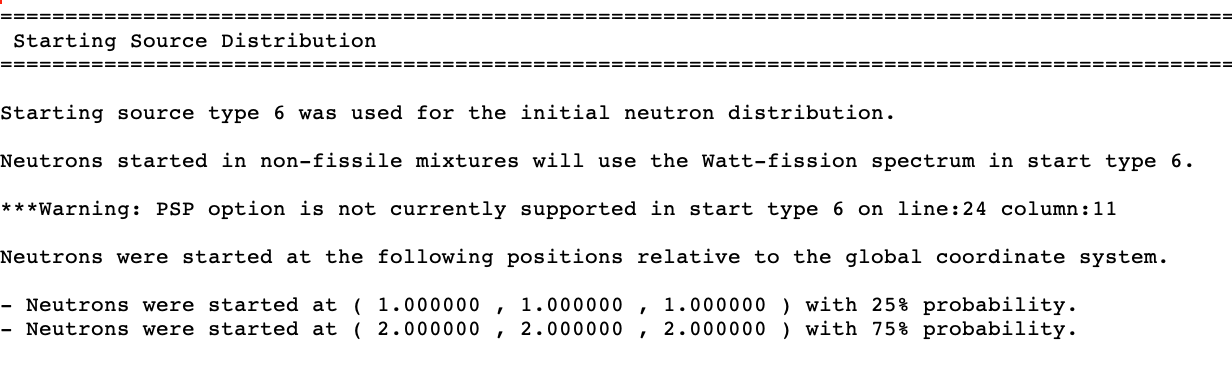
However,
CSAS-Shift creates a probability distribution from
the defined start type 6 points and samples starting
positions for NPG=15 particles using this distribution,
as shown in Fig. 2.2.3.
Fig. 2.2.3 Start type 6 output printed by CSAS-Shift.
In Monte Carlo calculation, the variance of the eigenvalue
(k-effective) at each generation is calculated as a sample variance,
which is the quantity obtained by assuming no correlation
over the generations. However, there is a correlation
among the fission sources over generations since the deviation
of fission source at a generation from its equilibrium distribution
is transferred to the following generations. To resolve this issue,
KENO codes use an iterative method to estimate the real variance.
[CritSafetyUMN97]
The same methodology is also implemented inside Shift transport,
so that printed k-effective uncertainties in both message and output files
are derived from the real variance estimates.
Caution
User may observe differences in k-effective uncertainty values
estimated by CSAS and CSAS-Shift sequences when running the identical
problem. This is mainly due to the use of a different k-effective estimator
in both KENO and Shift transport codes. Note that, KENO implements
absorption estimator in CE mode and collision estimator in MG mode,
whereas Shift implements track-length estimator for both CE and MG modes.
Warning
k-effective values and associated information from Shift
calculation and some diagnostics messages originated by Shift are
always printed to the standard output (and .msg file).
There is no user option to suppress these.
The CSAS-Shift sequence output is similar to the CSAS5 and
CSAS6 outputs, except the output section dedicated to
the transport module. See Sect. 2.1.5 for the layout
of the output, mixture table edit, and cross section processing summary
edits for a typical CSAS sequence.
This section contains a brief description of the
output section dedicated to the Shift transport module.
This section provides representative samples of
the output format. The actual data contained in this
section are not necessarily consistent with results
computed by the current version of CSAS-Shift.
The output layout of the Shift transport module
is generally similar to the typical KENO output edits printed in
the CSAS sequence output. However, some output edits are
printed in a very different format, and these are discussed
in this section.
Warning and error messages show stylistic differences
compared to the traditional CSAS and KENO
messages, and their details are not documented in this
manual.
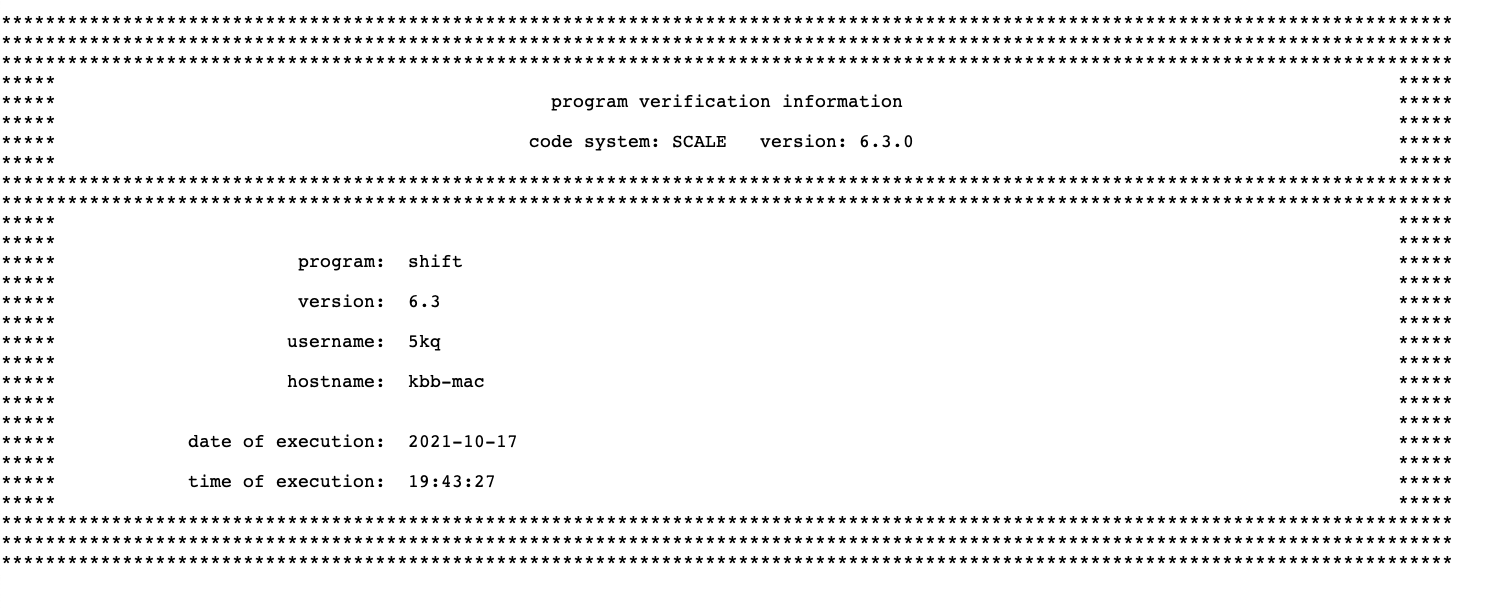
Program verification information Fig. 2.2.4
is printed after the header page. It lists the name of the program,
the date the load module was created, the library that contains the
load module, the computer code name from the configuration control
table, and the revision number. The job name, date, and time of
execution are also printed. This information may be used for quality assurance purposes.
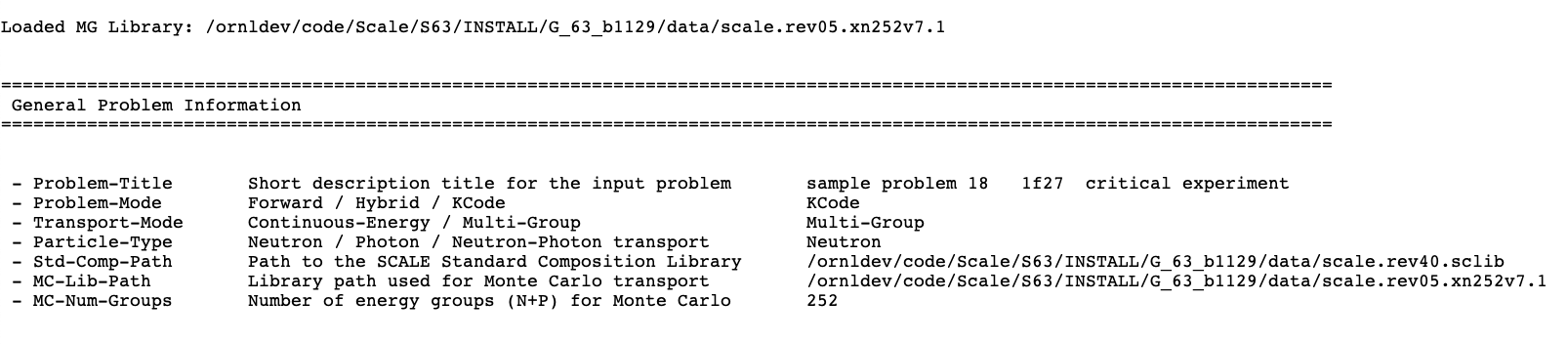
A general problem information output edit, shown in
Fig. 2.2.5, follows the program
verification information table. This table is printed by all
SCALE Shift sequence implementations. After printing the
title given in the input, it summarizes some high-level
information for the physics setup of the Shift code.
Fig. 2.2.5 Sample general problem information table.
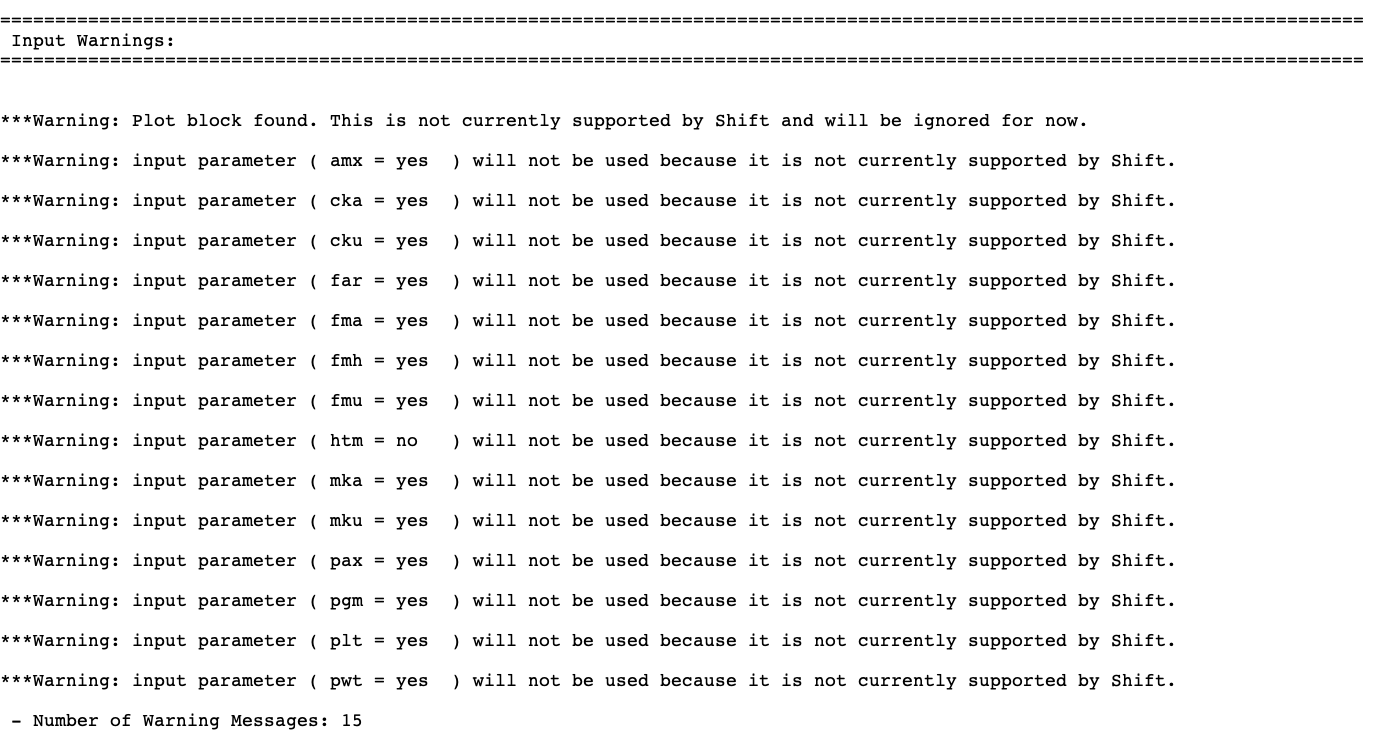
CSAS-Shift captures the warning messages emitted from
the ExnihiloInputBuilder when processing KENO data for the Shift transport.
All these stacked warning messages are printed in the input warnings output
table as shown in Fig. 2.2.6.
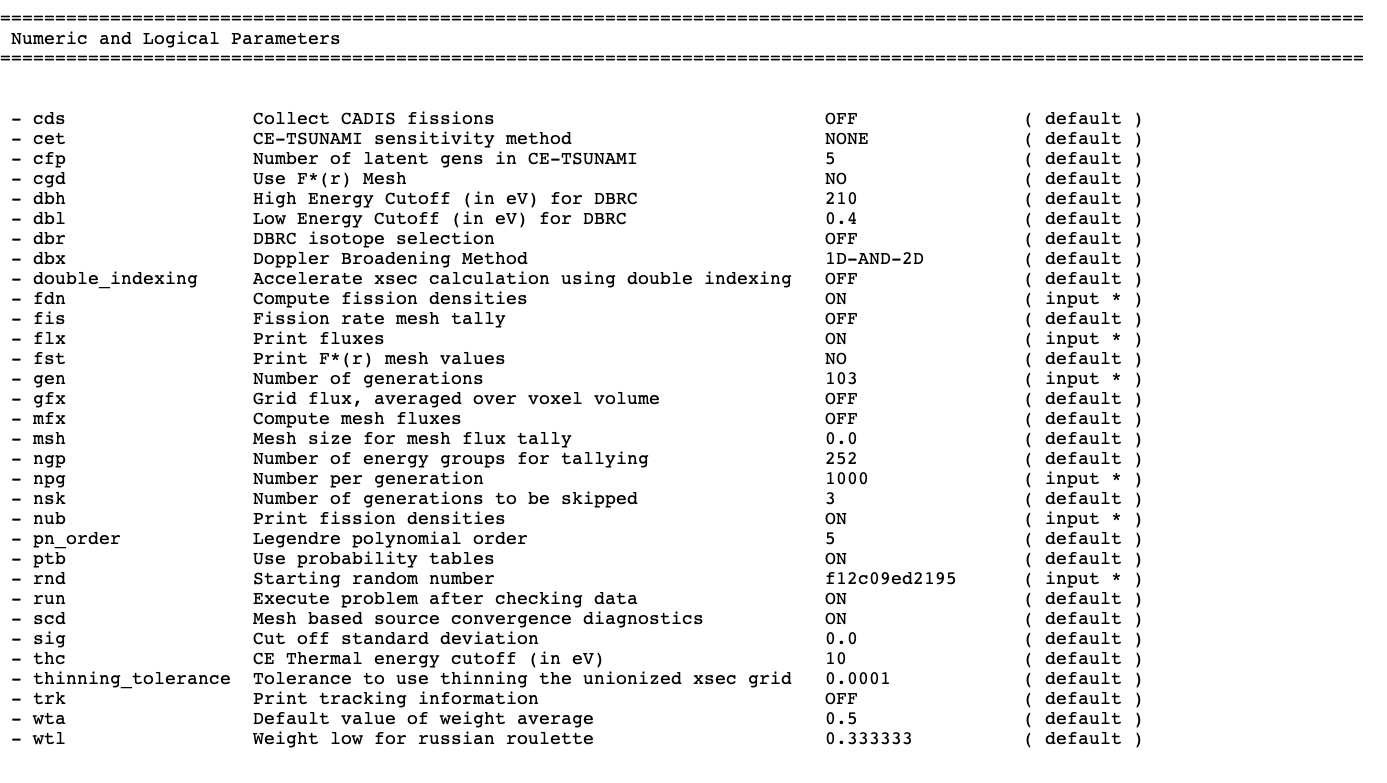
The CSAS-Shift parameter edits list both numeric and logical parameters
in the same table. In each table row, the name of the KENO parameter,
its short description, the current value of the parameter, and its
input method are printed. If the parameter
value has been entered by user in the KENO parameter data block,
the input method is printed as ( input * ). Otherwise, the input
method is printed as ( default ). The user should always verify
that the parameter data block was entered as desired. An example of
the parameters table is shown in Fig. 2.2.7.
Fig. 2.2.7 Sample table of numeric and logical parameter data.
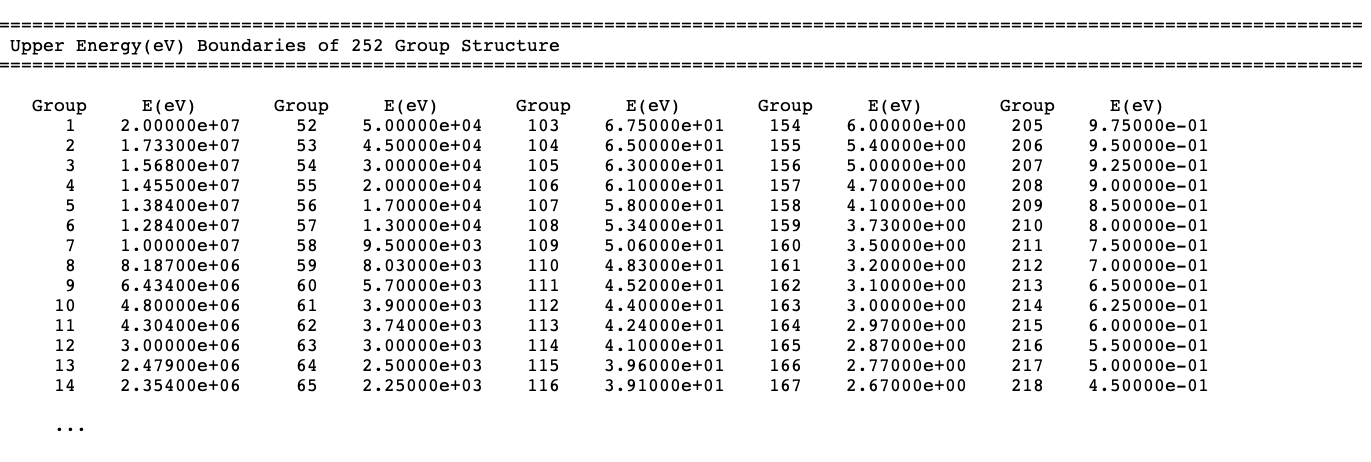
The CSAS-Shift implementation supports multiple sets of
energy boundaries specifications for some of the tallies. This can be
done by using the definitions data block as described in the CSAS manual
Sect. 2.1.4. However, it prints only the
default energy group bounds in the energy boundaries data edit, as illustrated
in Fig. 2.2.8. Energy group
boundaries used for each mesh tally will be printed in the mesh tallies
output edit.
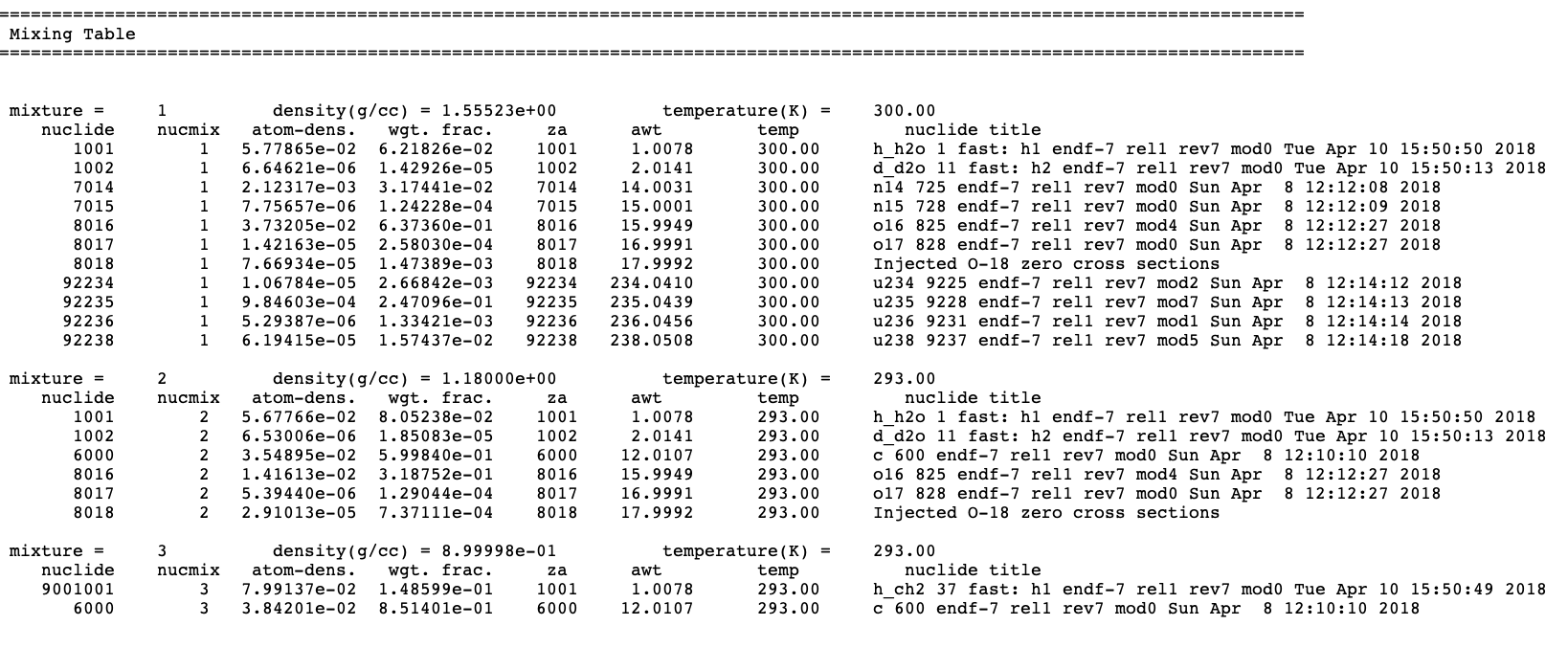
CSAS-Shift uses the same format and contents as those described
for KENO codes in Sect. 8.1.3.10 for the
mixing table data edits. In this table,
the mixture number, density, and
temperature are first printed, followed by a table of the nuclides which make
up the mixture. This table contains the following data: nuclide
ID number, nuclide mixture ID number, atom density, weight fraction of
nuclide in mixture, ZA number, atomic weight, temperature, and nuclide
title. Mixture temperature is the same as the nuclides’ temperatures for
the multigroup calculations, but it may show some differences in
continuous-energy calculations. See Sect. 8.1.3.10 for
details.
A sample mixing table data edit is shown in Fig. 2.2.9
for a multigroup calculation.
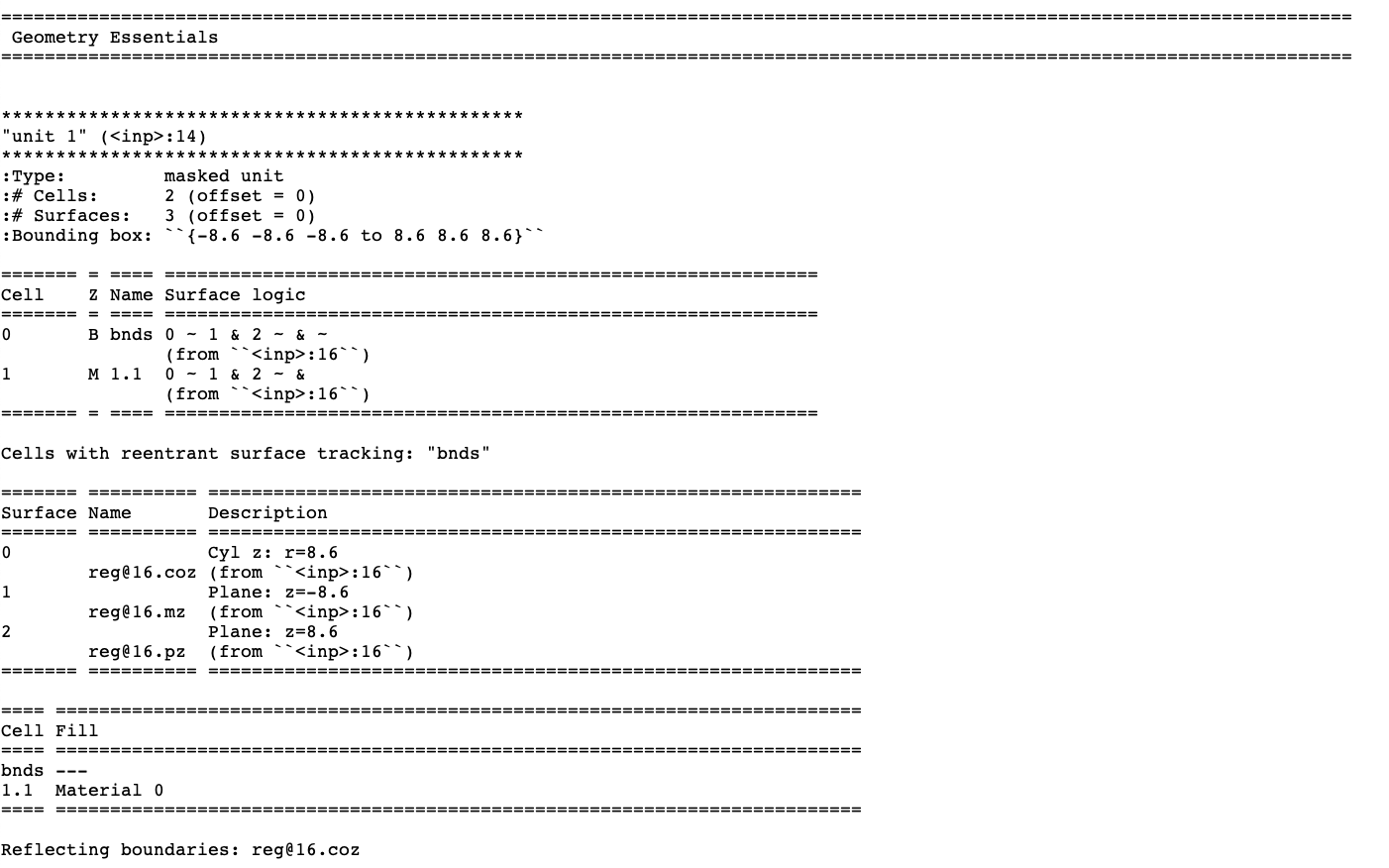
CSAS-Shift captures the output edit from ORANGE and
prints these data as the overview of the geometry. Its
format is completely different from the traditional
KENO geometry output format but includes more descriptive
sections for each geometry piece, as shown in
Fig. 2.2.10.
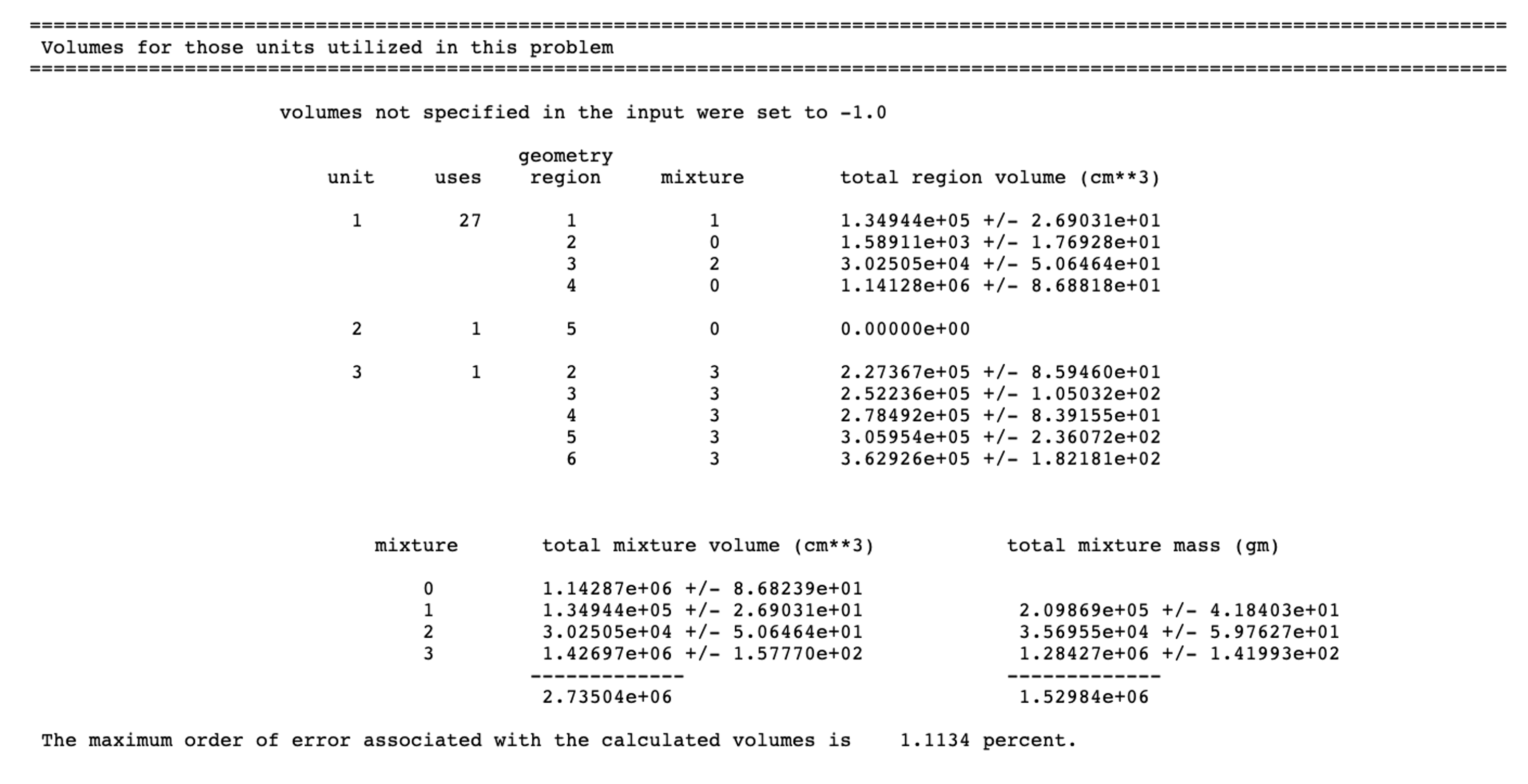
Volume tables for both KENO V.a and KENO-VI geometries
are always printed by CSAS-Shift using the KENO-style volume
editing format and cannot be suppressed. KENO V.a and KENO-VI
volume tables show some differences, and all these details
are described in KENO manual. See Sect. 8.1.5.17 for further
details.
A sample volume output edit for KENO-VI geometry printed by CSAS-Shift
is shown in Fig. 2.2.11.
A summary table is always printed for start types 0, 1, 6, 7, and 8.
The table format is the same for both KENO V.a and KENO-VI geometries.
Fig. 2.2.12 illustrates typical starting
data for start type 0. The parameter used in this example was NST=0.
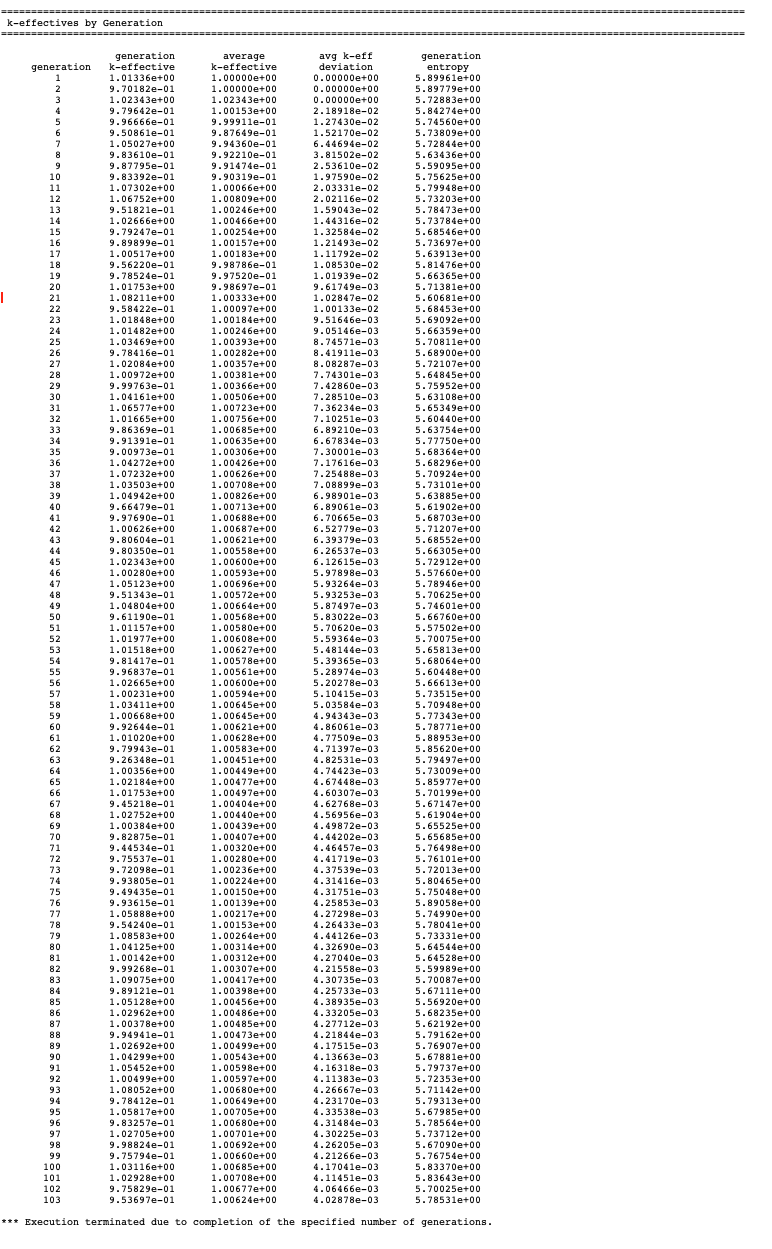
At the completion of each generation, CSAS-Shift prints
the k-effective for that generation and associated information obtained
from the Shift transport module. An example of this printout is
given in Fig. 2.2.13.
Fig. 2.2.13 Example of k-effectives and source entropy by generation.
The data printed include (1) the generation number, (2) the k-effective
calculated for the generation, (3) the average value of k-effective
through the current generation (excluding the nskip-1 generations),
(4) the deviation associated with the average k-effective, and (5) Shannon
entropy for the generation.
After the last generation, a message is printed to indicate why
execution was terminated. The user should examine this portion of the printed
results to ensure
that k-effective is in acceptable
agreement and to verify that the average value of k-effective has become
relatively stable. If the k-effectives appear to be oscillating or
drifting significantly, then the user should consider rerunning the
problem with a larger number of histories per generation.
Note
k-effective values from Shift calculations are always printed
to the standard output (and .msg file). There is no user
option to suppress this.
The problem characterization edit follows the k-effective by generation
edit. The average number of neutrons per fission, NU BAR, and
its associated deviation are printed, and the AVERAGE FISSION GROUP
(the average energy group at which fission occurs) and its associated
deviation are printed at the top of this edit. Then the
ENERGY (eV) OF THE AVERAGE LETHARGY OF NEUTRONS CAUSING FISSION and its
associated deviation are printed, followed by the system mean free path.
A typical problem characterization edit is shown in Fig. 2.2.14.
Fig. 2.2.14 Example of problem characterization edit.
Note
lifetime and generation time are not currently available with Shift
transport.
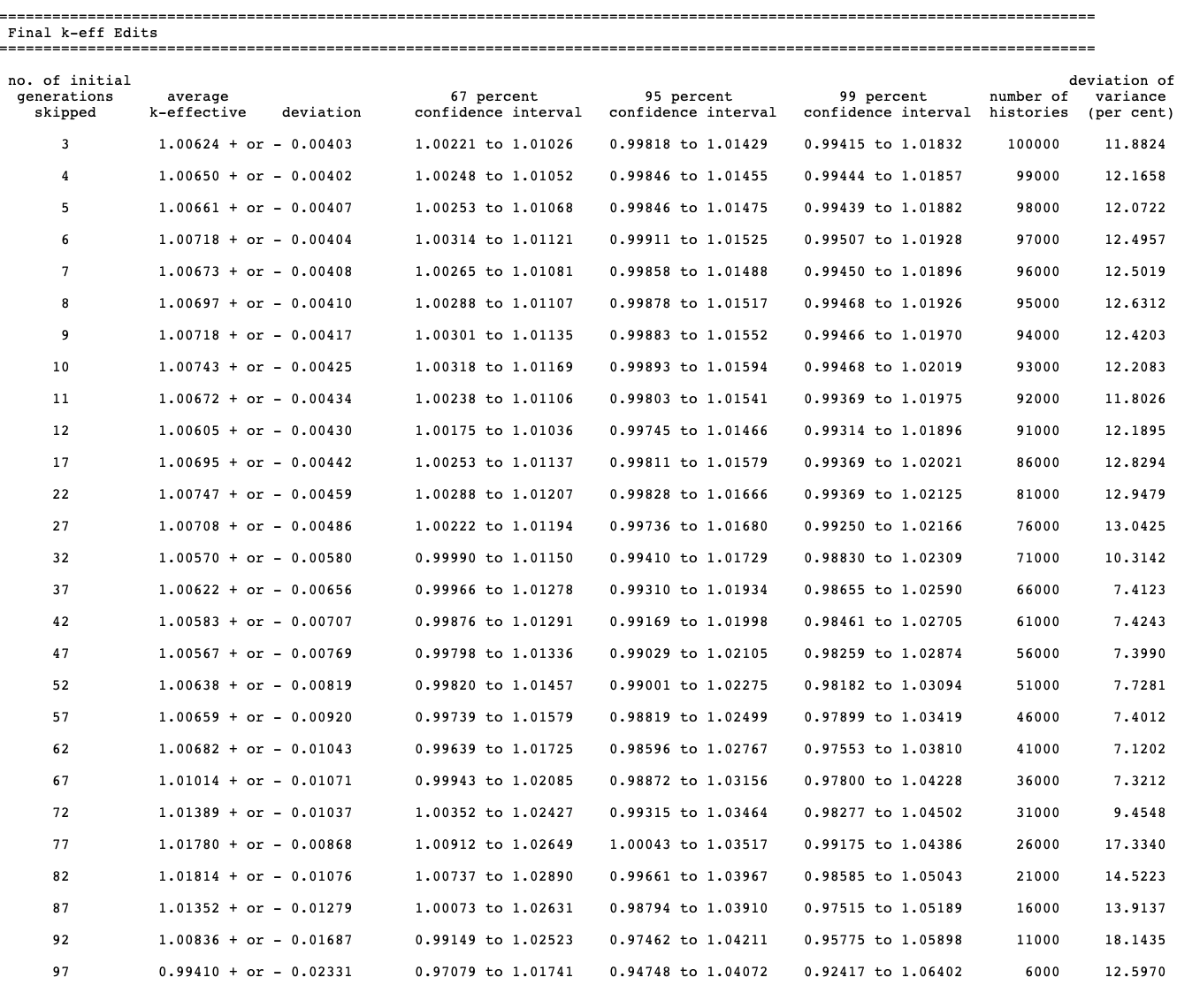
The final k-effective edit prints the average k-effective, its
associated deviation, and the limits of
k-effective for the 67, 95, and 99% confidence intervals. The number
of histories used in calculating the average k-effective is also
printed. This is done by skipping various numbers of generations. The
user should carefully examine the final k-effective edit to determine
whether the average k-effective is relatively stable. If a noticeable drift
is apparent as the number of initial generations skipped increases, then it
may indicate a problem in converging the source. If this appears to be
the case, the problem should be rerun with a better initial source
distribution and should be run for sufficient number of generations
so that the average k-effective becomes stable. The final
k-effective edit is printed as shown in Fig. 2.2.15.
Fig. 2.2.15 Example of the final k-effective edit.
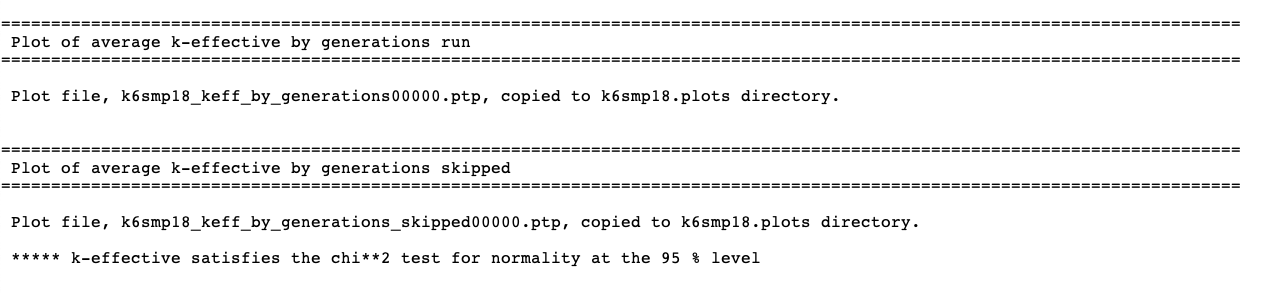
2.2.6.1.13. Plot of average k-effective by generations run and by generations skipped
ASCII character plots of the average k-effective versus
the number of generations run, and the average k-effective versus
the number of generations skipped, are not printed by CSAS-Shift
in the code output. Instead, two Ptolemy plot files are created
and copied into the plots directory in ${OUTDIR}. The name of
the plot files and their final destinations are printed in
the output, followed by the final k-effective edit as illustrated in
Fig. 2.2.16. These plot files can be
loaded and visualized by Fulcrum using the display convergence plots
capability.
Fig. 2.2.16 Information about the average k-effective plot files.
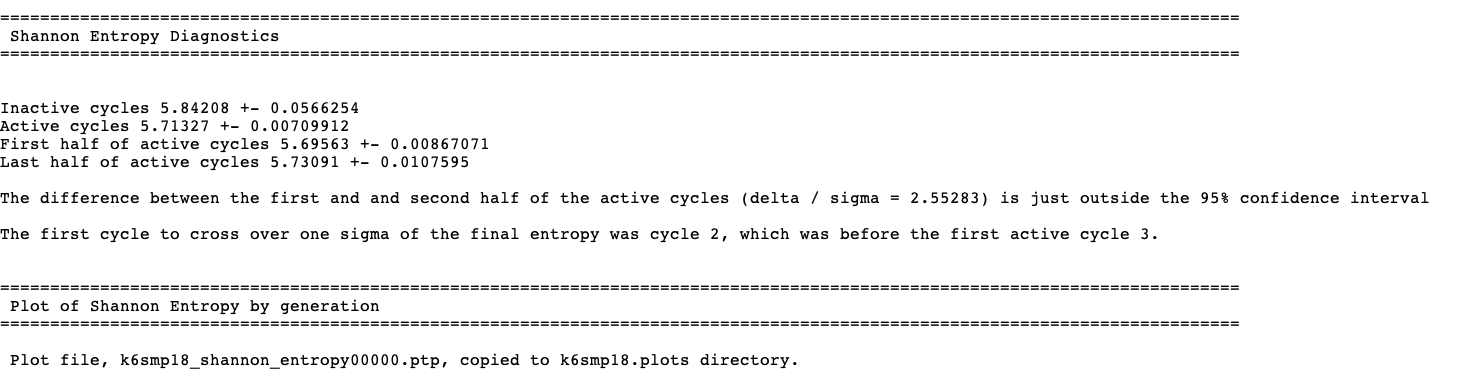
CSAS-Shift does not perform any posterior entropy tests like those
available in KENO codes. Instead, it captures diagnostic
test results performed by Shift and prints its details
in the Shannon entropy diagnostics output edit, as shown in
Fig. 2.2.17
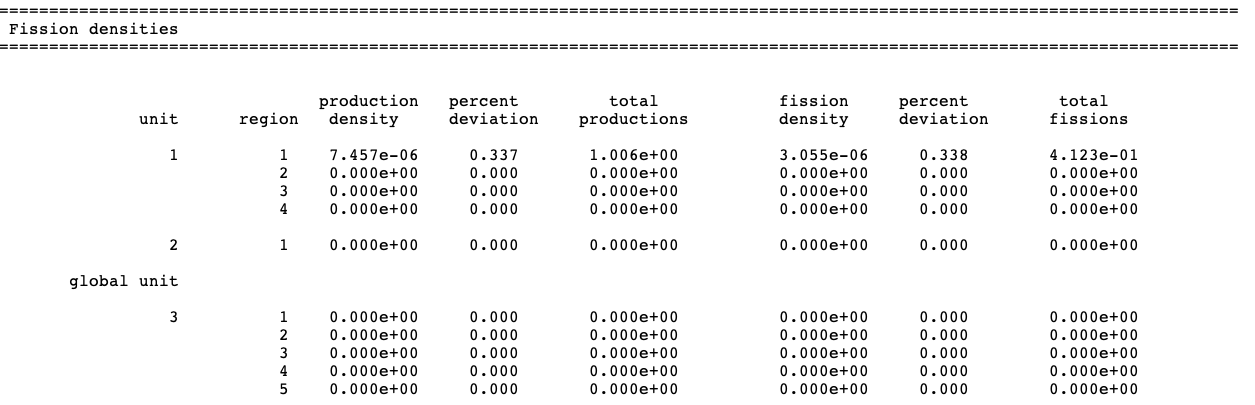
The fission density edit is optional. CSAS-Shift prints
the neutron production density and the fission density
for each geometry region if parameters FDN=YES and NUB=YES
are specified in the parameter data (these are the default values).
If NUB=NO is specified but FDN=YES, then only the
production density will be given. An example of the fission
density edit is shown in Fig. 2.2.18
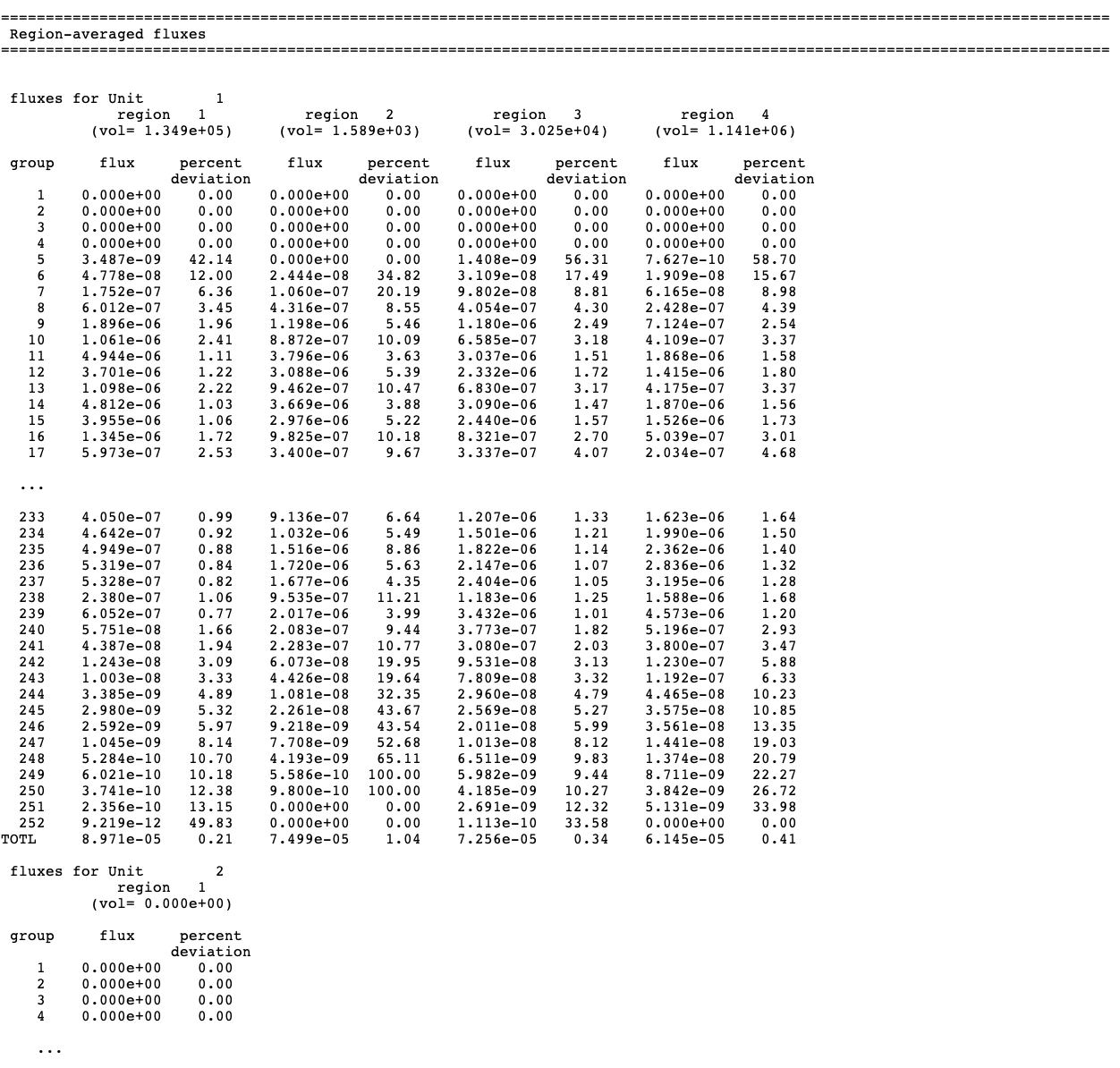
Printing the fluxes is optional; they are printed only if
FLX=YES is specified in the parameter data.
The fluxes are printed for each unit and each
geometry region in the unit for every energy group.
A sample of a flux edit is given in Fig. 2.2.19.
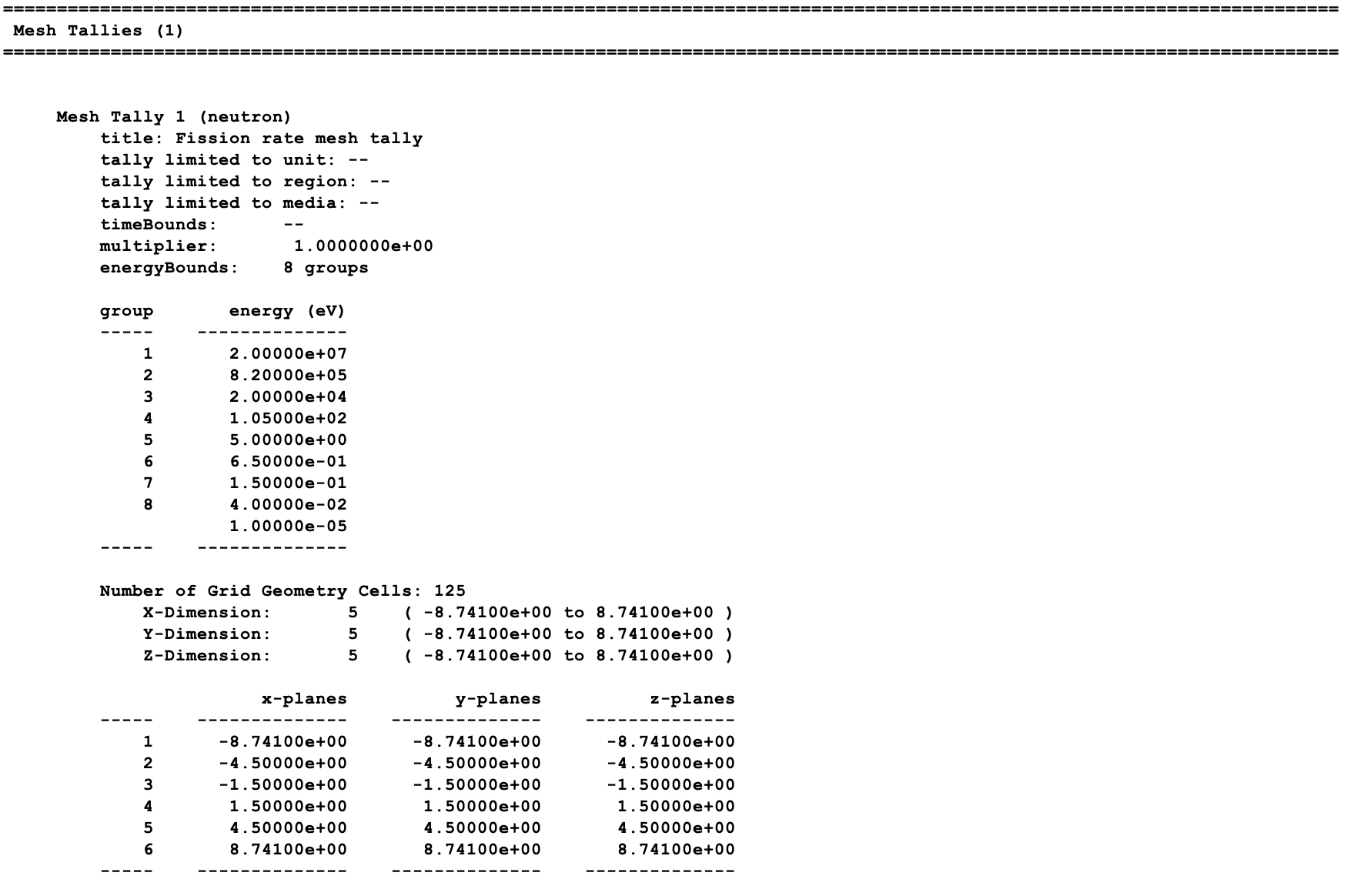
The mesh tallies edit is optional. CSAS-Shift prints the specification
of each mesh tally either defined by CDS=, FIS=, and GFX=
parameters or a mesh tally input block in the tallies data block. A sample
mesh tallies edit is given in Fig. 2.2.20.
The number of tallies computed for the given problem is printed just after
the mesh tallies edit title. Then, a summary section including
the tally title and multiplier is provided. A summary of the energy
and spatial grids is presented after this section.
The mesh tally files edit is optional. CSAS-Shift stores the mesh tally
results in MeshFile format in 3dmap files, and this output summarizes
the mesh tally and corresponding 3dmap filename as depicted
in Fig. 2.2.21.
2.2.6.1.19. Plot of relative frequency distributions
A relative frequency distribution consists of a bar graph indicating
the normalized number of generations that have k-effective in a specified
interval. The intervals are determined by the code, based on the upper
and lower limits of the k-effectives calculated for the generations.
A relative frequency distribution plot includes the following bar graphs:
(1) all active generations, (2) the last 3/4 of active generations,
(3) the last half of active generations, and (4) the last quarter of
active generations. Note that departures from normal distributions
in these plots and radical shifts among them may be indications of
source convergence issues in the calculation.
A Ptolemy plot file is created and copied into the ${BASENAME}.plots
directory in ${OUTDIR}. The name of the plot file and its final destination
are printed in the output, in the plot of relative frequency
distributions edit as illustrated in Fig. 2.2.22.
The plot file can be directly visualized by Fulcrum’s displayconvergenceplot capability.
Fig. 2.2.22 Information about the relative frequency distributions plot file.
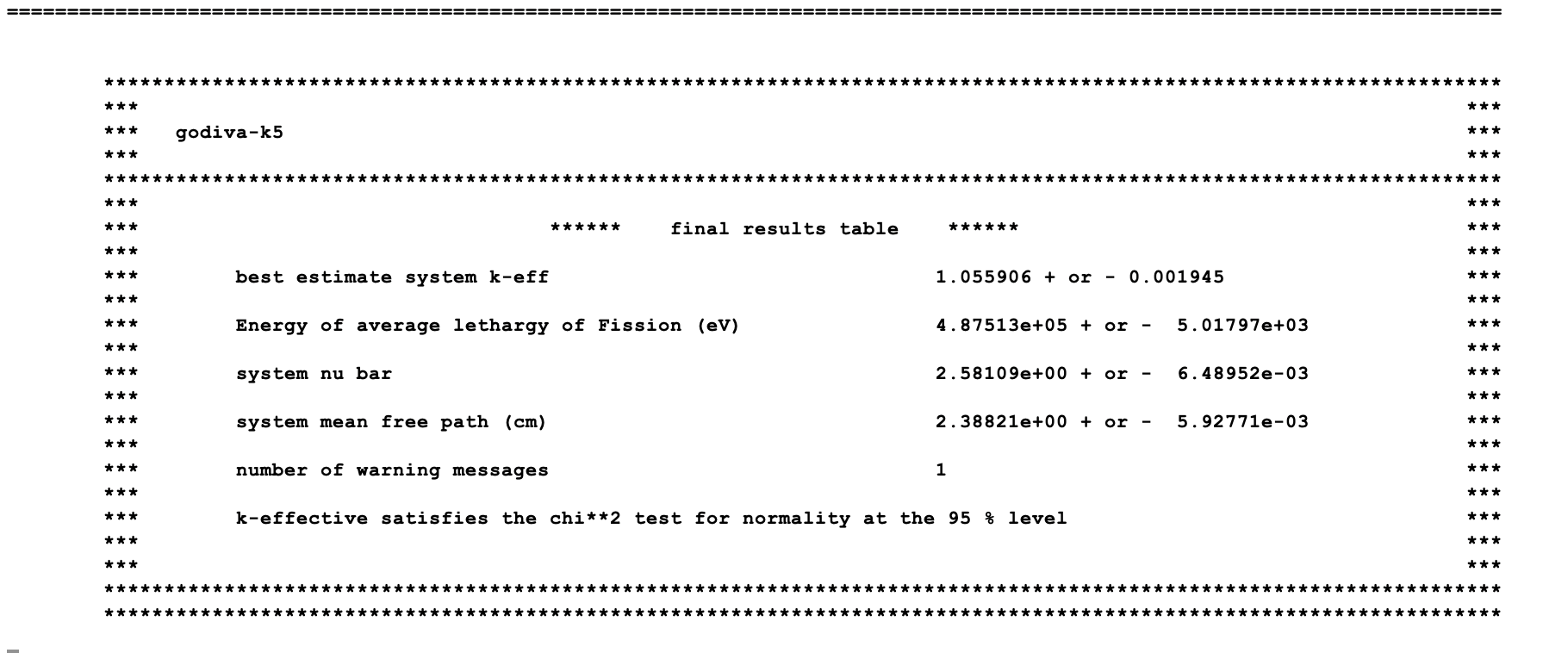
The final results table contains a summary of the most important physics
parameters of the system and the number of warning and error messages
generated during code execution. The table contains the best-estimate
system k-effective with one standard deviation, the energy of the average
lethargy of fission, the average system nu-bar, the average mean free
path of a neutron throughout the system, the number of warning
messages generated during code execution, and a final statement on
the convergence of the \(\chi^2\) test
results, as shown in Fig. 2.2.23.
Fig. 2.2.23 An example of the final results table.
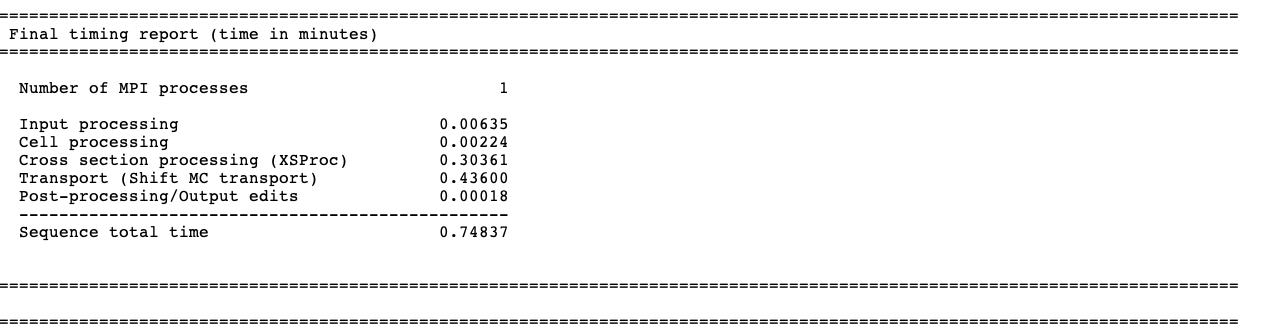
The final timing report table summarizes the time
elapsed for input processing, cell processing (for multigroup mode),
cross section processing (for multigroup mode), the entire transport
process (Shift transport), and post-processing performed by
the CSAS-Shift sequence after obtaining all results from
the Shift transport calculation. A sample timing report
obtained for a multigroup calculation is shown in Fig. 2.2.24.
Fig. 2.2.24 An example of the final results table.
Thomas M. Evans, Alissa S. Stafford, Rachel N. Slaybaugh, and Kevin T. Clarno. Denovo: A new three-dimensional parallel discrete ordinates code in SCALE. Nuclear technology, 171(2):171–200, 2010.
T. M. Pandya, S. R. Johnson, Evans, T.M., G. G. Davidson, S. P. Hamilton, and A. T. Godfrey. Implementation, capabilities, and benchmarking of shift, a massively parallel monte carlo radiation transport code. Journal of Computational Physics, 308:239–272, 2016. Publisher: Elsevier.