11.3. Processing ENDF Data
In order to produce MG and CE libraries, various AMPX codes read evaluated data from ENDF formatted files [ampx-GLP+76]. A collection of ENDF/B formatted evaluation are called tapes, and they contain one or more evaluations. Evaluations are made up of files, which can be thought of as sections with specific types of information. The following table gives a brief overview of the file information processed by AMPX at this writing:
File Number |
Description |
|---|---|
File 1 |
File 1 contains two parts:
|
File 2 |
File 2 contains resolved and unresolved resonance parameters. The information is processed by modules POLIDENT, PRUDE, and PURM. |
File 3 |
File 3 contains point-wise cross section data and Q values for each reaction. The information is processed by modules POLIDENT, PRUDE, PURM and Y12. |
File 4 |
File 4 contains angular distributions of secondary particles for incident neutrons. The information is processed by module Y12. |
File 5 |
File 5 contains energy distributions of secondary particles for incident neutrons. The information is processed by module Y12. |
File 6 |
File 6 contains angular and energy distributions of secondary particles. It is more general than the information that can be given in Files 4 and 5. The information is processed by module Y12. |
File 7 |
File 7 contains thermal neutron scattering data. The information is processed by modules Y12. |
File 8 |
File 8 contains radioactive decay and fission product data. |
File 9 |
File 9 contains multiplicities for production of radioactive nuclides. The information is processed by module POLIDENT, which saves the data for further processing by LIPTON. |
File 10 |
File 10 contains cross sections for production of radioactive nuclides. The information is processed by module POLIDENT, which saves the data for further processing by LIPTON. |
File 12 |
File 12 contains the photon production multiplicities and transition probabilities. The data are processed by module Y12. |
File 13 |
File 13 is similar to File 12, but gives absolute photon production cross sections. The data are processed by module Y12. |
File 14 |
File 14 contains photon angular distributions. The information needs to be combined with Files 13 and 15 data to generate photon yield scattering matrices. The data are processed by module Y12. |
File 15 |
File 15 contains energy distributions for emitted photons. The information must be combined with Files 12 and 14 data to generate photon yield scattering matrices. The data are processed by module Y12. |
File 23 |
File 23 gives the smooth photon interaction cross sections for incident gammas. The information is processed by module Y12. |
File 27 |
File 27 gives the form factors and scattering functions for photons. |
File 31 |
File 31 gives covariance information for the average number of neutrons per fission. The information is processed by module PUFF-IV. |
File 32 |
File 32 gives covariance information for the resonance parameters. The information is processed by module PUFF-IV. |
File 33 |
File 33 gives covariance information for the neutron cross sections. The information is processed by module PUFF-IV. |
Fle 35 |
File 35 gives covariance information for exit energy distributions. The information is processed by module CHICOV. |
All ENDF evaluations contain a File 1, which provides textual information about the evaluation.
With respect to AMPX processing, the evaluations can be categorized into four groups:
A standard incident neutron evaluation contains Files 1, 2 and 3 and possibly Files 4, 5, 6, 12, 13, 14, 15, 31, 32, and 33.
A standard incident gamma evaluation contains Files 1, 23, and 27
A thermal moderator evaluation like 1H in H2O contains Files 1 and 7 only. Thermal moderator evaluations are the only evaluations containing File 7 data
A decay file contains File 8 and is used to generate decay and gamma emission libraries for use in depletion calculations.
Incident neutron evaluations containing Files 9 and/or 10 and possibly Files 2 and/or 3 are used to generate libraries containing branching information for use in depletion calculations.
At this writing, these are the only files processed by AMPX.
Several kinds of libraries are created by AMPX:
MG or CE libraries for incident neutrons. These libraries are used for neutron transport calculations, and they use information from Files 1, 2, 3, 4, 5, 6, 7, 12, 13,14, and 15. Note that information from files 12–15 is only used in coupled neutron–gamma calculations.
MG or CE libraries for incident gammas. These libraries are also used in transport calculations, and they use information from Files 23 and 27.
Covariance libraries for MG data. The libraries use information from Files 1, 2, 3, 31, 32, 33 and 35.
Decay and gamma libraries for use in depletion calculations. These libraries use information from Files 2, 3, 8, 9, and 10.
As stated above, thermal moderator evaluations only contain File 7 information, which gives cross section data and scattering information in the thermal range. In a CE or MG library, the thermal information is combined with data from a different evaluation outside the thermal range. For example, the thermal moderator information is given for 1H in H2O in ENDF/B-VII.0. In order to make a full MG or CE library, the thermal moderator information is combined with cross section and scattering information from 1H, which is referred to as the fast evaluation coupled to the thermal moderator H2O. For a standard evaluation, a free gas treatment is used to calculate the thermal scattering matrices.
Some modules are required to create the libraries supported by the AMPX system. The detailed steps needed to create the various types of libraries are outlined in the next sections. While it is relatively easy to set up the required sequence of modules for one evaluation, a typical library has hundreds of nuclides. A graphical user interface (GUI) called ExSite has been provided to help set up inputs to process all desired evaluations. A detailed description of the GUI is given in Section 4. The following section contains an overview of the steps required. A more detailed description of the functionality of some of the key modules is provided in Sect. 11.6.
11.3.1. Creating an MG Library
The general flow of a sequence to generate a neutron MG library is show in Fig. 11.3.1, and the flow is described in detail below. Inputs for all desired evaluations are typically created automatically using the AMPX GUI.
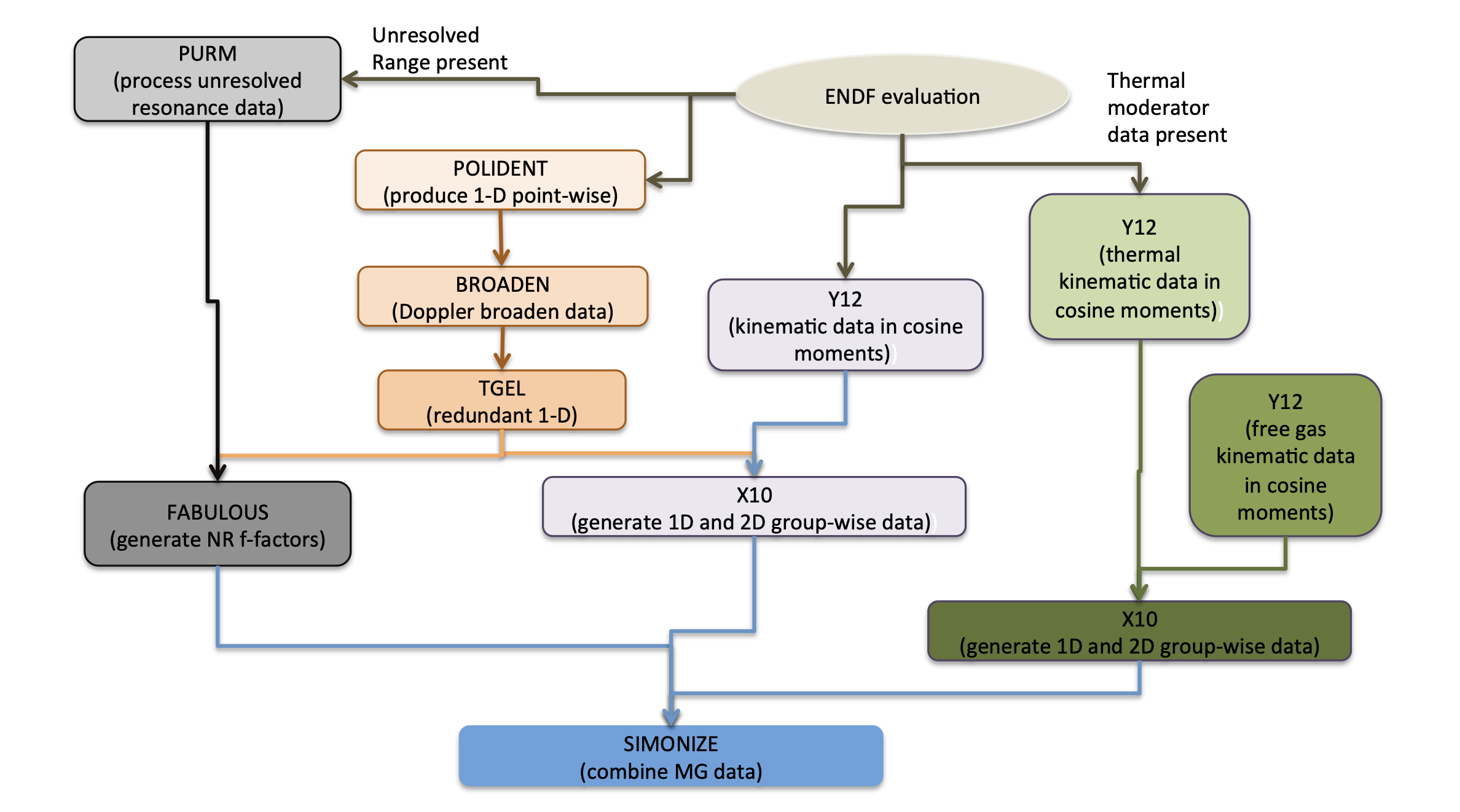
Fig. 11.3.1 AMPX sequence for producing neutron MG library for one isotope.
The procedure is as follows:
The module POLIDENT is used to create the point-wise cross section at 0 K for all neutron evaluations, excluding thermal moderators. The module POLIDENT reconstructs the point-wise data in the resolved and unresolved range if File 2 provides resonance parameters. These data are combined with the point-wise data given in File 3. The module TGEL is used to reconstruct the total cross section from the partial reactions.
The module BROADEN is used to Doppler broaden the point-wise cross section data created in steps 1 and 2. The temperatures at which broadening is required include the temperature at which infinite dilute cross section data are to be saved in the library, as well as all temperatures for which Bondarenko factors are to be generated.
The module TGEL is used to reconstruct the total cross section from the partial reactions after broadening.
The module Y12 is used to generate the kinematics data for neutron scattering. If a coupled library is desired, Y12 is also used to generate the gamma production scattering data.
A suitable weighting function for neutron data is generated using the module JERGENS. The user can also supply a temperature and ZA dependent weighting function.
The module PICKEZE is run to select the 1D cross section at the desired temperatures from the data generated in step 3.
The module X10 is run in neutron mode to generate the neutron 1-D cross section data and the neutron scattering matrices. The module uses the point data generated in step 6, the kinematics data from step 4, and the weighting function from step 5.
If the library contains thermal moderator data, the module Y12 is used to generate point-wise cross section and kinematics data for the thermal moderators from File 7.
The module X10 is run in neutron mode to generate the thermal moderator data. The module uses the point data and kinematics data from step 8 and weighting function from step 5.
If thermal moderator data do not exist, the module Y12 is used to generate thermal scattering matrices for free gas scattering. The weighting function generated in step 5 is used for the MG collapse performed in neutron mode in X10.
If the MG library should contain gamma production data, module X10 is run in yield mode using the point data generated in step 6, the kinematics data from step 4, and the weighting function generated in step 5.
If a coupled library is desired, the module Y12 is used to generate to generate point-wise cross section and kinematics data for all gamma evaluations to be included in the library.
A suitable weighting function for gamma data is generated using the module JERGENS.
The module X10 is run in gamma mode to generate a gamma MG library. The module uses the point data and kinematics data from step 11 and the weighting function from step 13.
If a neutron evaluation contains unresolved resonance data, module PRUDE is used to generate the cross section data in the unresolved resonance range for the desired temperatures and background values. If the probability tables are to be used for the creation of f-factors, module PURM and PURM_UP are used to generate probability tables.
The module FABULOUS is used to generate the Bondarenko factors. It uses the point-data generated in steps 3 and 15 (if applicable) and the MG library generated in step 7. The neutron weighting function generated in step 5 is used to collapse point-wise data. The MG library created in step 9 is used to ensure that the infinite-dilute cross sections used to generate the Bondarenko factors are consistent with the 1-D cross section in the library. If the use of probability tables in the unresolved range is desired, FABULOUS_URR is used instead.
The module SIMONIZE is used to combine all the parts into one MG library. SIMONIZE recalculates all redundant cross section data and renormalizes scattering matrices as needed.
The module RADE is used to ensure that the library is correct.
The module AJAX is used to bind the MG libraries for each evaluation produced in step 17 into the final MG library.
11.3.2. Creating a CE Library
As with MG library generation, inputs for all desired evaluations are typically created automatically using the AMPX GUI. The procedure to produce neutron and gamma CE libraries is outlined below.
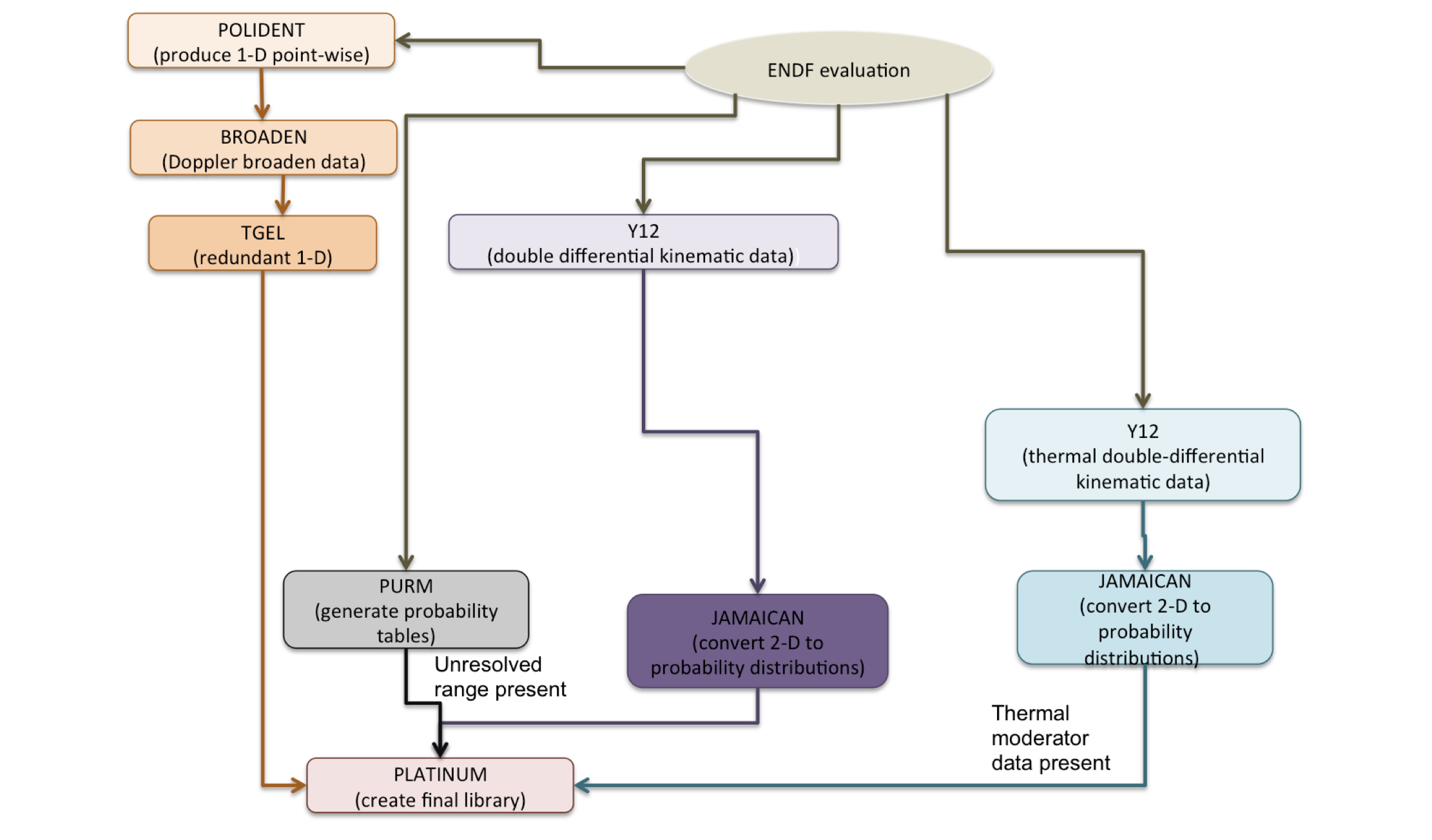
Fig. 11.3.2 AMPX sequence for producing neutron CE libraries for one isotope.
For a standard neutron evaluation, the process to generate a CE library is as follows:
The module POLIDENT is used to create the point-wise cross sections at 0 K for all neutron evaluations, excluding thermal moderators. Module POLIDENT reconstructs the point-wise data in the resolved and unresolved range if File 2 provides resonance parameters. These data are combined with the point-wise data given in File 3. The module TGEL is used to reconstruct the total cross section from the partial reactions.
The module BROADEN is used to Doppler broaden the point-wise cross section data created in step 2.
The module TGEL is used to reconstruct the total cross section from the partial reactions.
The module PICKEZE is run to eliminate the 0 K data for reactions that are Doppler broadened.
The module TGEL is run again to re-construct total, capture, inelastic, and absorption cross sections.
The module Y12 is used to generate the kinematics data for neutron scattering and gamma-production scattering. The data are produced in a tabulated double-differential form.
The module JAMAICAN is run to convert the double differential point-wise distribution into a marginal probability distribution in angle and conditional probability distribution in exit energy.
If the evaluation contains unresolved resonance data, the modules PURM and PURM_UP are run for each desired temperature to generate probability tables in the unresolved resonance range.
The module PLATINUM is run to create the final CE library. The data produced in steps 5–8 are combined, and the 1D collision probabilities are calculated.
When processing a thermal moderator, the thermal moderator data given in File 7 must be combined with a suitable evaluation in the higher energy range (fast data). In this case, the procedure is as follows:
The module POLIDENT is used to create the point-wise cross section at 0 K for the fast data (for example, 1H if generating a library for H2O)
The module TGEL is used to reconstruct the total cross section from the partial reactions.
The module BROADEN is used to Doppler broaden the point-wise cross section data created in step 2 to the same temperatures used in the thermal evaluation.
Steps 4–8 from the procedure for a standard evaluation are run to produce the kinematics data for nonthermal reactions (for example, 1H if generating a library for H2O).
The module Y12 is run to process the thermal data from File 7. The module JAMAICAN is run to produce a marginal probability distribution in angle and conditional probability distribution in exit energy. In addition, a 1D cross section is produced for thermal reactions 1007 and 1008.
The module TGEL is used to generate the sum of the 1D thermal cross section data. The result is stored in MT=2, the elastic cross section.
The module SPLICER is used to override MT=2 in the data produced in step 3 in the thermal range with the data produced in step 6.
The module TGEL is run once more to update the total cross section after the update in the elastic cross section.
The module ZEST is run to combine the 1D thermal data from step 5 with the data produced in step 8 into one file.
The module PLATINUM is run to create the final CE library. The data produced in steps 4, 5, and 9 are combined and the 1D collision probabilities are calculated.
In the case of incident gammas, the ENDF evaluation contains Files 23 and 27. The procedure to process a gamma CE-library is as follows:
The module Y12 is run to generate 1-D point-wise gamma data and kinematics data.
The module JAMAICAN is run to generate marginal probability distribution in angle and conditional probability distribution in exit energy.
The module PLATINUM is run to create the final CE library. The data produced in steps 1 and 2 are combined into one library.